.png?width=200&height=89&name=CC%20%20fiserv.%20(3).png)
Overview
A sub member is someone who shares a primary member's membership, such as a spouse or a child. You add them from the primary member's profile, either as a new person or from an existing customer record.
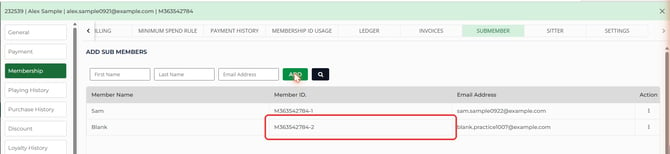
Each sub member gets a Membership ID based on the primary's, with a number added: -1 for the first, -2 for the next, and so on. Billing stays with the primary member. A sub member's charges post to the primary's ledger.
Before you start
The primary member needs a membership class, so their Membership tab is open. See Browser - Customers: Assign a Membership Class to a Customer.
Add a new person as a sub member
- Go to Customers and select the Members tab.
- Find the primary member, select the ⋮ menu on their row, and select View/Edit.
- Select Membership in the menu on the left, then select SUBMEMBER in the strip across the top.
- Under ADD SUB MEMBERS, enter the person's First Name, Last Name and Email Address.
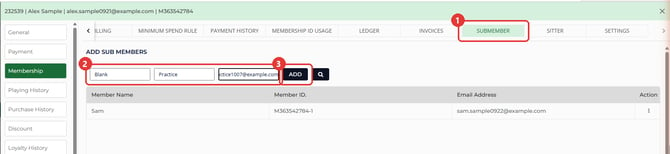
- Select ADD. A message confirms the save. Select OK, and the sub member appears in the list with their Member ID.
Add an existing customer as a sub member
If the person is already in your customer list, pick their existing record instead of typing them in again.
- Open the primary member's Membership tab and select SUBMEMBER, as above.
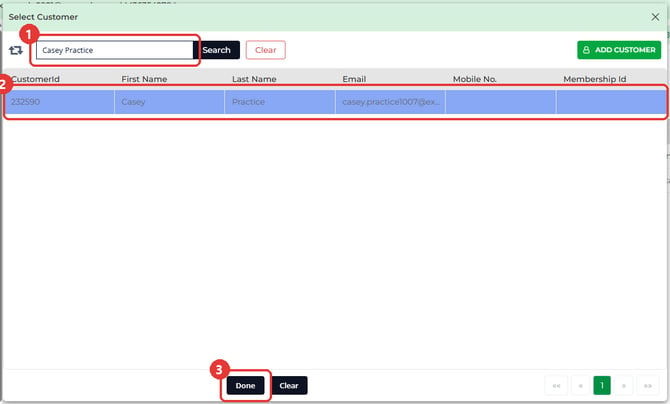
- Select the search icon next to ADD. The Select Customer window opens.
- Type the customer's name in the search box and select Search.
- Select the customer's row so it's highlighted, then select Done. A message confirms the save, and they appear in the sub member list.
Remove a sub member
- On the primary member's SUBMEMBER tab, select the ⋮ menu on the sub member's row. Check it's the right person first, because Delete takes effect without a second prompt.
- Select Delete. A message confirms the change.
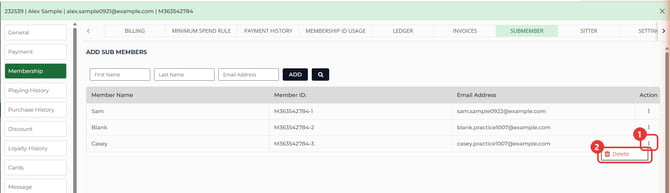
The person stays in your customer list as a regular customer. They're no longer on the primary's membership.
Common Questions
Why can't I open the Ledger on a sub member's profile?
A sub member doesn't have a ledger of their own. Their charges go to the primary member. Open the primary member's profile to see the balance.
Do I need an email address for a sub member?
Give each sub member their own email address. If Email Address is left blank, the save can stop with a message that the email is already in use, so enter the sub member's address before you select ADD.
Can I add a sub member from the sub member's own profile?
No. The SUBMEMBER tab is grayed out on a sub member's profile. Open the primary member instead.