.png?width=200&height=89&name=CC%20%20fiserv.%20(3).png)
Overview
When a member needs a new password for the member portal, you can set one from their profile in Club Caddie Browser. The password lives in the Online Profile section of the member's SETTINGS tab. You don't need the old password: saving a new one replaces it.
Type the new password twice, once in each box, and save it with the Save inside the Online Profile section. Then tell the member their new password yourself.
Open the member's Online Profile
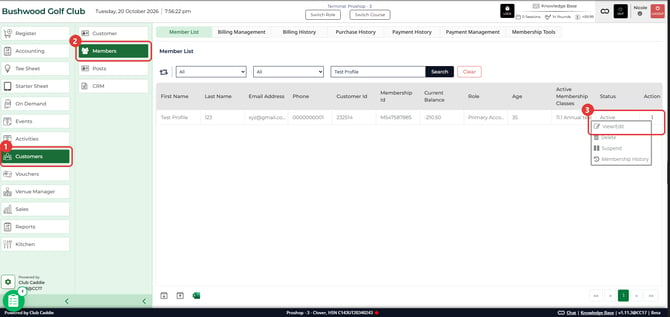
- Go to Customers and click Members. The Member List opens.
- Type the member's name or Id in Search By Member Name or Id and click Search.
- In the member's row, select the ⋮ menu under Action, then select View/Edit. The member's profile opens.
- Select Membership in the menu on the left, then select the SETTINGS tab. If SETTINGS is out of view, use the arrows at the ends of the tab strip.
Set the new password
- In Online Profile, type the new password in Password :.
- Type the same password again in Confirm Password :. The Save in the Online Profile section turns on once both boxes have a value.
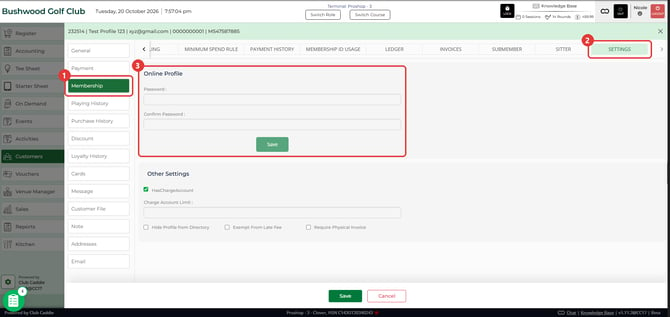
- Click the Save in the Online Profile section. When the password saves, both boxes clear.
- Give the member their new password.
Common Questions
Why is the Online Profile Save grayed out?
One or both boxes are empty. Type the password in Password : and again in Confirm Password :, and Save turns on.
What does "Password and Confirm Password doesn't match" mean?
The two boxes hold different passwords. Click OK, type the same password in both boxes and click Save again.
Does the Save at the bottom of the page save the password?
No. The Save at the bottom of the page saves Other Settings, such as Charge Account Limit :. Use the Save inside Online Profile for the password.
Can I see the member's current password?
No. The Password : and Confirm Password : boxes open empty. You type a new password, and saving it replaces the old one.
Does Club Caddie tell the member their new password?
Saving here doesn't send the member a notice, so let them know the new password yourself.
How do I do this on the Desktop app?
The Desktop steps are in Members : Online Profile Password Reset.