
Overview
Refund a sale in the Club Caddie Browser app from Sales. You pick the items to refund, type a reason and choose where the money goes back. Club Caddie records the refund as a new order with its own Order ID, and the original order keeps its total and status in Sales. For a prepaid tee time, you can open the same refund window from the Tee Sheet with Issue Refund, then cancel the booking.
Before you start
- Your role needs permission to refund orders. If Refund is greyed out on a paid order, ask a manager.
- The order must be paid. Refund is greyed out on a Pending order.
Refund a sale from Sales
- Click Sales in the left menu. The Recent Orders list opens.
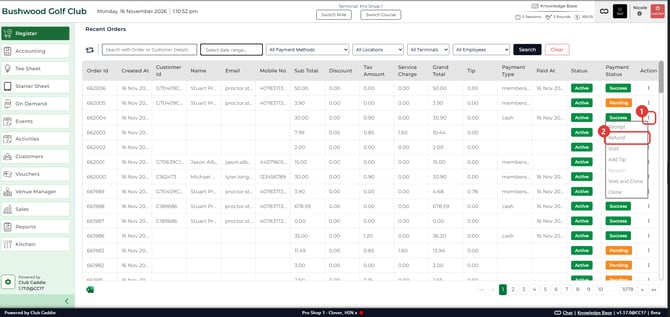
- Find the order. Click the ⋮ icon in its Action column and select Refund. The Order Details window opens.
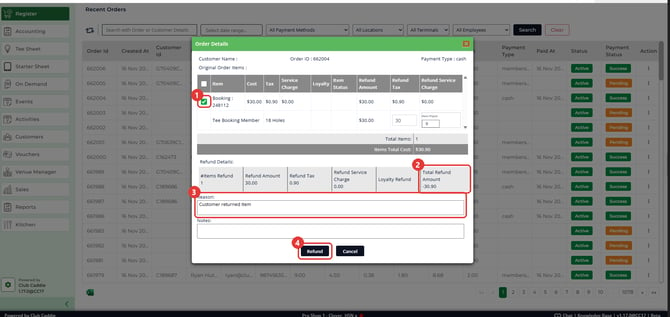
- Tick the items you are refunding. Total Refund Amount updates and shows as a negative number.
- Type a Reason, then click Refund.
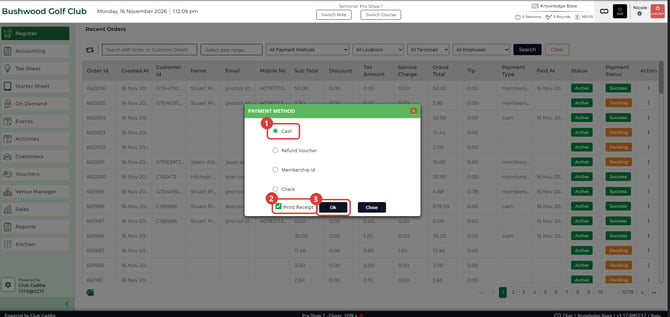
- In the PAYMENT METHOD window, check where the money goes back. Club Caddie usually selects the method the order was paid with. Check it before you go on, especially for an order paid more than one way.
- Leave Print Receipt ticked if you want a receipt, then click Ok. Club Caddie creates the refund order.
Refund a prepaid tee time, then cancel it
Cancelling a tee time leaves its deposit on the order, so refund the deposit first, then cancel.
- Go to Tee Sheet in the left menu.
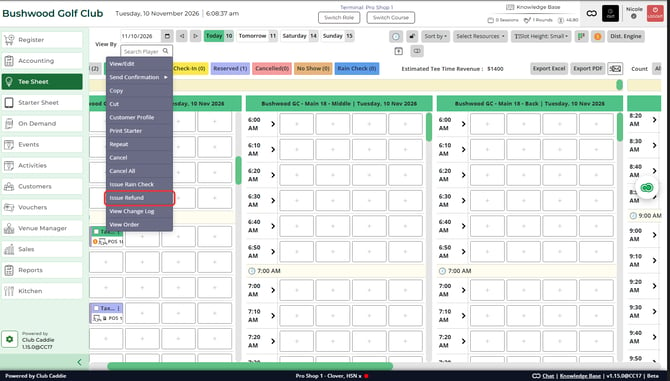
- Right click the paid booking, or click its ⋮ icon, and select Issue Refund. If Club Caddie asks for a PIN, a manager enters it. The same Order Details window opens for the booking's order.
- Tick the items, type a Reason and click Refund.
- In the PAYMENT METHOD window, check the method and click Ok.
- Right click the booking again and select Cancel to cancel the tee time.
Common Questions
When is Refund greyed out?
When the order is Pending, or when your role does not have permission to refund orders. A Pending order cannot be refunded. For the permission, a manager can do the refund or turn the permission on for your role in Manage Roles.
Which payment methods show in the PAYMENT METHOD window?
That depends on whether your club restricts refunds to the original payment method. When it does, the window lists the method the order was paid with, plus Raincheck Voucher if your role can issue rain checks. An order paid more than one way still shows the full list. When it does not, you can also pick Cash, Refund Voucher, Membership Id, Check or one of your club's own payment types. For an order paid with loyalty points, the window lists Loyalty and Raincheck Voucher.
Where do I find the refund afterwards?
In Sales, as its own order with a new Order ID. The original order's receipt Notes read Refunded In Order followed by the refund's Order ID.
Can I refund the same item twice?
No. Once an item is refunded, its Item Status reads Returned the next time you open Refund on that order.
Where is the deposit if the tee time was cancelled first?
On the original order in Sales, since the tee sheet no longer shows it. Open Refund on that order to return it.
Should I refund or void?
If you need to undo a sale from today, a void may suit better. See Browser - Sales : Voiding a Transaction.