.png?width=200&height=89&name=CC%20%20fiserv.%20(3).png)
Overview
The Online Tee Time Settings block sets the rules for golfers who book a tee time online. It covers how many golfers can book a tee time and how far ahead they can book. It also covers the time the furthest bookable day opens, whether golfers choose their starting tee, and how long before the tee time they can cancel on their own. It sits near the bottom of the Tee Sheet Settings tab, below Interval Time Setting.
Each setting saves one of two ways. Toggles and drop-downs save the moment you change them. Boxes and the days list need the button next to them.
Before you start
The Flat Fee Deposit Per Player For Online Bookings ($) : and Make Tee Time Deposit Non-Refundable : rows show when Prepaid Tee Time Liability is on in General Settings, higher up the same tab.
Open the Online Tee Time Settings
- Go to Settings and click Tee Sheet Settings in the left menu.
- Stay on the Tee Sheet Settings tab, which is the first tab.
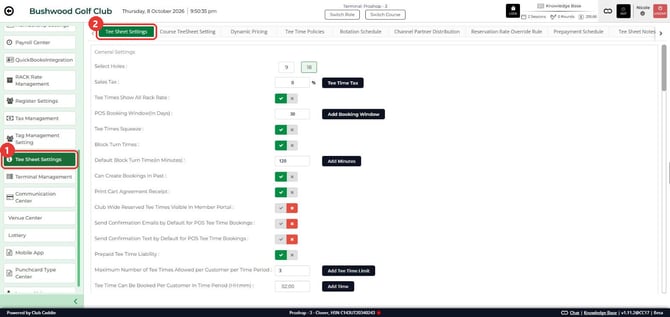
- Scroll down to Online Tee Time Settings.
- Give the screen about 20 seconds before you read the toggles. The screen loads in two steps, and three rows fill in last.
Change a setting
- For a toggle or a drop-down, make your choice. It saves at once and Update Success appears. Click OK.
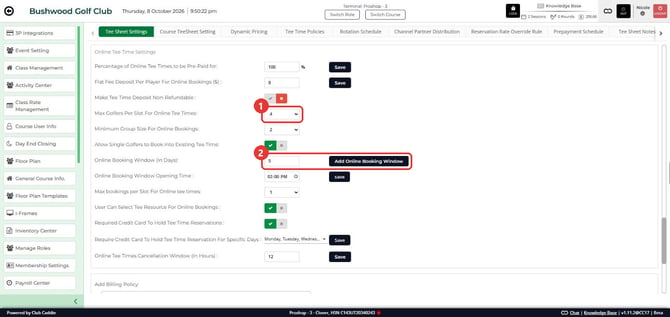
- For a box, type the value and click the button beside it: Save, Add Online Booking Window or, for the opening time, save. A number you type and leave without clicking the button is not saved.
- Click OK on the confirmation. The opening time shows success instead of Update Success.
Set how many golfers can book online
- Max Golfers Per Slot For Online Tee Times: the most golfers one tee time can hold when golfers book online. The choices run from 1 to 6. Golfers already on the tee time count, whether staff or a golfer booked them.
- Max bookings per Slot For Online tee times: the number of separate bookings one tee time can hold when golfers book online, from 1 to 5. Once a tee time has that many bookings, online golfers stop seeing it.
- Minimum Group Size For Online Bookings: the club-wide smallest group an online golfer can book, from 1 to 4. A minimum set on a rate class can replace it. Not Set shows until a number is saved. With Allow Single Golfers to Book into Existing Tee Time: off and a minimum of 2, a tee time with one open spot is not offered to online golfers.
- Allow Single Golfers to Book into Existing Tee Time: when this is on, a group smaller than the minimum can book into a tee time that already has golfers on it. On the online booking page, an empty tee time still shows the minimum.
Set how far ahead golfers can book
- Online Booking Window (In Days): how many days ahead golfers can book online. Type the number and click Add Online Booking Window. A booking window set on an individual rate replaces this number for that rate.
- Online Booking Window Opening Time : the time of day, on the course's clock, when the furthest day opens. Pick the time and click save. With 5 days and 2:00 PM, the days up to four days out are open all day, and the day five days out opens at 2:00 PM. The time applies to that one furthest day.
- The POS Booking Window(In Days) : box in General Settings is a separate setting.
Choose how golfers pick a starting tee
- User Can Select Tee Resource For Online Bookings : when this is on, golfers choose which part of the course to start on. When it is off, they do not get that choice.
Set the cancellation window
- Online Tee Times Cancellation Window (In Hours) : the number of hours before the tee time that golfers can no longer cancel online on their own. Type the hours and click Save. Staff can still cancel from the Tee Sheet.
Spot the payment settings
These rows set up prepayment, deposits, refund handling and card holds:
- Percentage of Online Tee Times to be Pre-Paid for:
- Flat Fee Deposit Per Player For Online Bookings ($) :
- Make Tee Time Deposit Non-Refundable :
- Required Credit Card To Hold Tee Time Reservations :
- Require Credit Card To Hold Tee Time Reservation For Specific Days :
This article names them. It does not cover how they charge or hold a card. The Prepayment Schedule tab is where prepayment rules by date, time and day are set up.
Common Questions
When are all the toggles ready to read?
Three rows fill in 10 to 20 seconds after the rest of the page: Allow Single Golfers to Book into Existing Tee Time:, Required Credit Card To Hold Tee Time Reservations : and the days list. Wait about 20 seconds, then read them.
Do I need to click Save after I change a toggle or a drop-down?
No. They save when you change them, and Update Success confirms it.
How do I save a number I typed?
A box saves when you click the button beside it. Typing does not save it. Click Save, Add Online Booking Window or save, and the number stays after you reload.
What is the difference between Max Golfers Per Slot and Max bookings per Slot?
Max Golfers Per Slot counts golfers on a tee time. Max bookings per Slot counts separate bookings. A foursome booked as one reservation is one booking and four golfers.
Where are the flat fee and non-refundable rows?
They show when Prepaid Tee Time Liability is on in General Settings. With it off, the flat fee row is gone.