
Overview
On an 18-hole booking, the turn is where and when the group starts its second nine. The booking window shows it as Turn Where (which nine, for example Middle or Back) and Turn Time. You can set them on a new booking or change them on an existing one.
Before you start
Turn Where and Turn Time only show when the booking is set to 18 H and Block Turn Times is on in Settings > Tee Sheet Settings. On a 9-hole booking, or with Block Turn Times off, you will not see them.
Change the turn on a booking
- Go to Tee Sheet. Click Today, or pick the date in the date box.
- Open the booking window:
- New booking: click the + in an open spot, or click the time and select Book Tee Time.
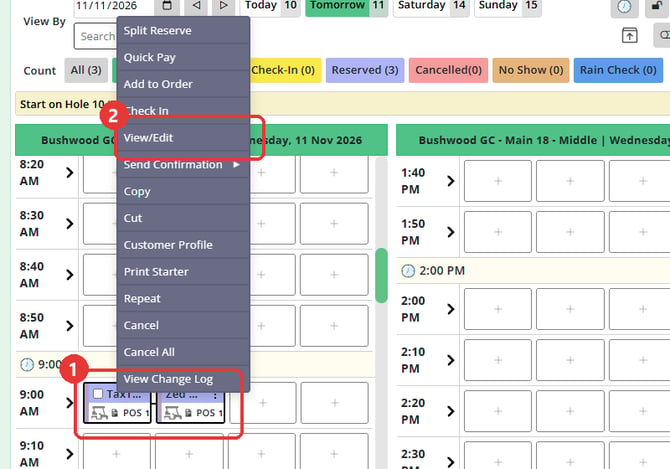
- Existing booking: double-click the booking. You can also right-click the booking, or click its ⋮ icon, and select View/Edit.
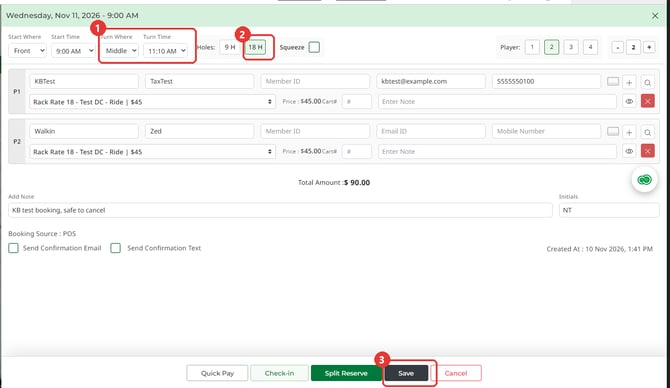
- Check that 18 H is selected, then pick the nine in Turn Where and the time in Turn Time.
- Click Reserve for a new booking, or Save for an existing one.
Common Questions
Why can't I see Turn Where and Turn Time?
The booking is set to 9 holes, or Block Turn Times is off in Settings > Tee Sheet Settings. Select 18 H on the booking, or ask your administrator to check the setting.
Does a single click on a booking open it?
No. A single click ticks the booking so you can select more than one. Double-click it, or right-click it and select View/Edit.