
Overview
A golf league event on the tee sheet holds the tee times for the league's players. On league day, you check in the golfers who showed up from that event, then take their fees. Each golfer can be checked in for one or more of the league's fees, such as a greens fee or a skins game.

Check in league golfers
- Go to Tee Sheet and pick the league date.
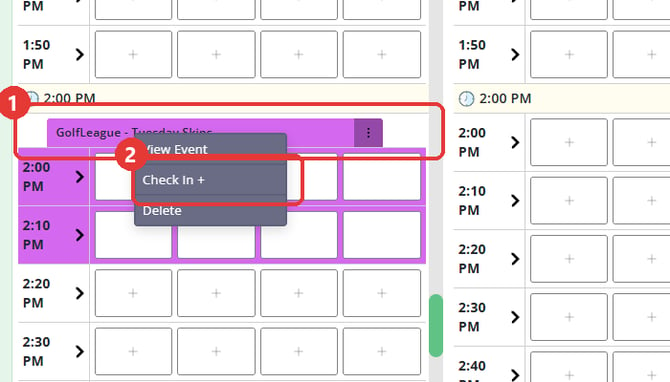
- Click the golf league event's bar on the tee sheet (a right-click works too) and select Check In +.
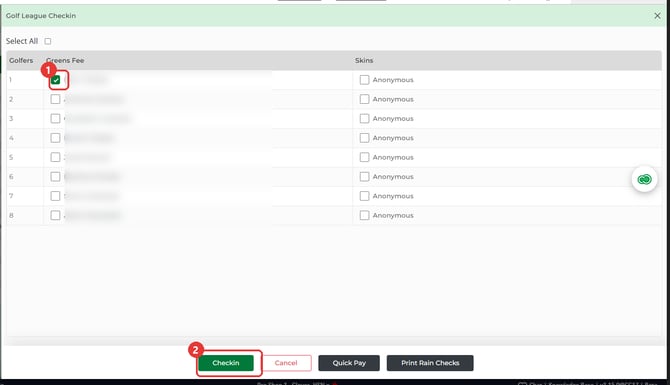
- The Golf League Checkin window lists the league's golfers, with a column for each league fee. Tick the fees for each golfer you are checking in. Select All ticks every fee for every golfer who has not paid yet.
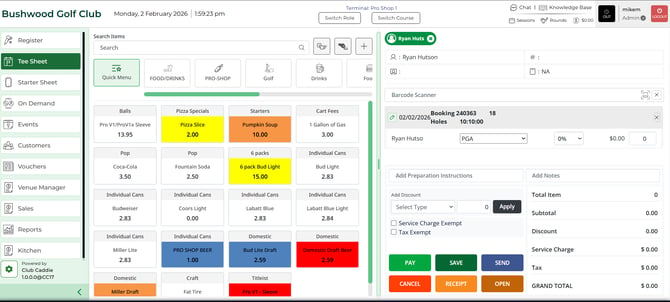
- Click Checkin. The Register opens with the league charges for the golfers you ticked.
- Take payment in the Register as usual.
Common Questions
Why can't I tick some golfers?
Those golfers have already paid, so their fees are locked.
What does Cancel do?
It closes Golf League Checkin without checking anyone in.