.png?width=200&height=89&name=CC%20%20fiserv.%20(3).png)
Step 1: Understanding what a no show is:
A no-show occurs when a golfer fails to appear for a reserved tee time, which has been recorded either by the club directly or through online booking by the golfer.
Step 2: System Handling of No Shows:
The Club Caddie software automatically identifies a tee time as a no-show 30 minutes post the scheduled time, provided the golfer has not checked in through the software. Note, there is no manual process to label a booking as a no-show.
Step 3: Identifying No Shows on the Tee Sheet:
The system designates the tee time to signal a no-show.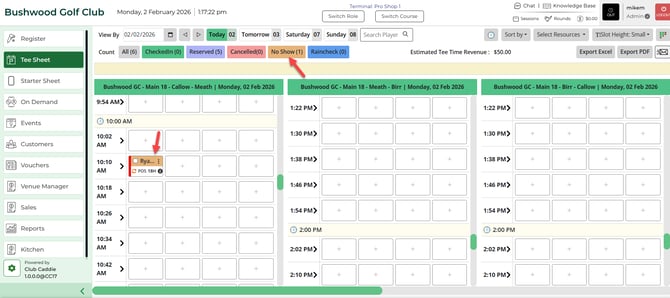
Step 4: Filtering for No Shows:
To filter the tee sheet for no-shows, select the "No Show" option located in the "Sort By" section at the top right of the tee sheet. The "No Show" label will display the count of no-shows for the selected date, if applicable.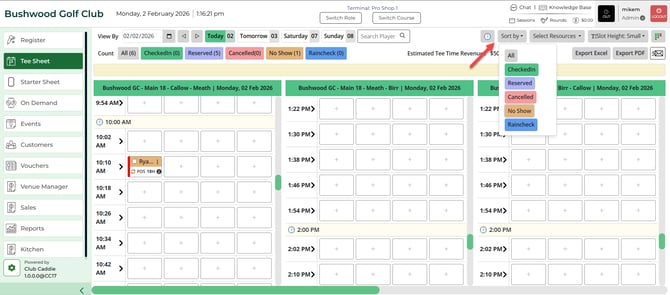
Step 5: Reviewing Golfer History for No Show Data:
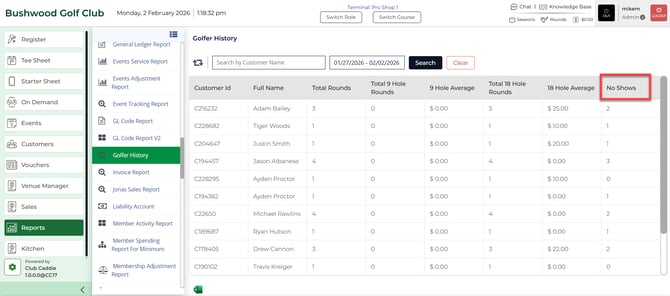
Access the Golfer History report to view each golfer's no-show occurrences, with the ability to filter by date.