.png?width=200&height=89&name=CC%20%20fiserv.%20(3).png)


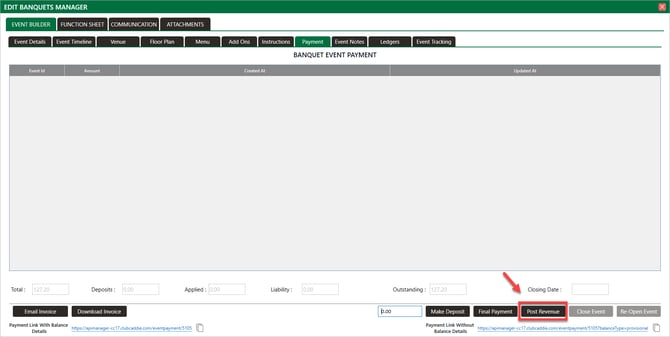
Post Revenue and Close Event are two separate steps.
-
Post Revenue pushes items to reports.
-
Close Event locks the event from editing.
-
You can Post Revenue without Closing the event, and you should review the posted revenue in reports before clicking Close Event.
If you need to correct an amount that has already been posted to revenue, use the Events Ledger → Make Adjustment workflow with Backdated Adjustments enabled. See the Events: Backdated Ledger Adjustments article. Do not try to void posting transactions to fix revenue amounts — use the Ledger Adjustment workflow instead
After confirming charges, users can finalize by selecting Close Event to lock the event from being edited.
Once you have Posted Revenue, you can still charge items to your event but it must be done through the register using Event Charge.
If you are not able to Post Revenue, most likely the permission in Manage Roles is toggled off. Please have a manager navigate to Settings > Manage Roles > Action > Edit Permissions > Event Manager to toggle on the permission.

The Re-Open Event button is only visible after an event has been Closed. It unlocks the event so additional Event Charges from the Register can be added before you Close it again.
