.png?width=200&height=89&name=CC%20%20fiserv.%20(3).png)
This article is for members checking their own account balance online — or for staff walking a member through it over the phone or at the front desk. If you're a Club Caddie operator looking for the admin-side setup, see the "For staff" section near the end.
Where to find it
- Log in to your club's Membership Portal. If you haven't set up your login yet, search this knowledge base for Setting Up and Logging Into the Member Portal.
- Once logged in, select Payment History from the left-hand menu. This section appears for member logins (it isn't shown to non-member customer-portal users), and your club can rename it — so if you don't see "Payment History" exactly, look for your club's name for the balances or payment section.
What you'll see
- Current Balance, shown at the top of the page — your account's balance on file with your club.
- A table below it listing your payment/charge history, with columns for Order Date, Name, Member ID, Payment Amount, Payment Type, Previous Balance, Current Balance, Status, and Description. The Previous/Current Balance columns on each row show what your balance was immediately before and after that specific transaction.
- A date-range filter (Start Date / End Date) to narrow the list.
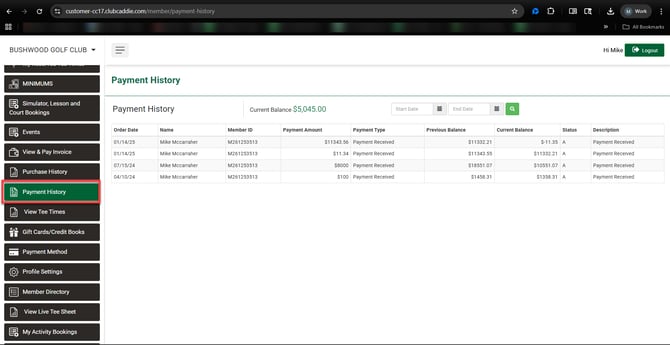
If your balance ever looks different than you expected, that's a question for your club, not a portal glitch — the portal simply displays the balance your club's system has on file for your account.
For staff — the admin-side path into the portal
Staff can also reach the Membership Portal from inside Club Caddie:
- Click the Gear Wheel icon in the top right corner, then select I-Frames from the left-hand menu.
- In the I-Frames window, click the link on the Membership row. This opens the Membership Portal in a new tab.
- Log in with the member's User ID (Membership ID or Email) and password, or have the member log in themselves.
- From there, follow the same steps above to view the balance.
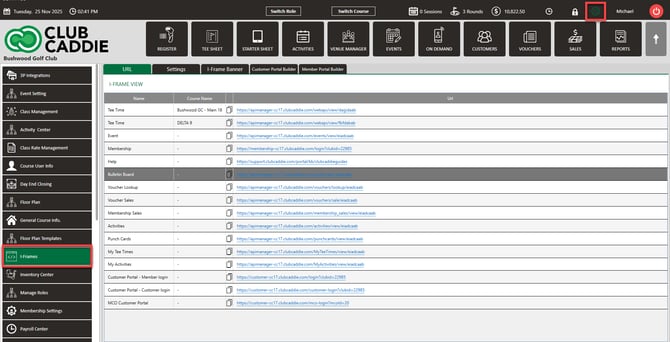
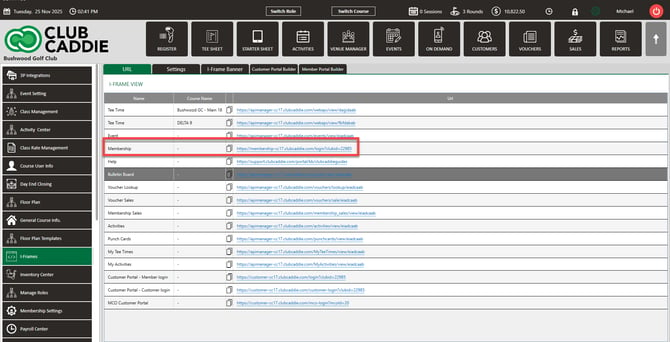
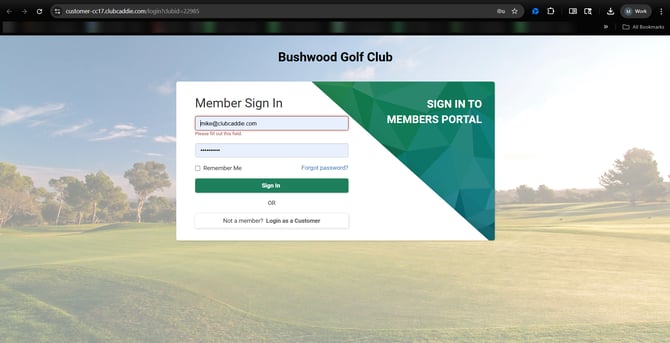
This path is useful when a staff member is looking something up on a member's behalf, but it's not how members reach the portal day to day — most members go straight to the portal login page.
Common Questions
Why does my balance look different from what I paid?
The Current Balance shown at the top of the page reflects your whole account after all charges and payments, not just your most recent one. (The "Current Balance" column inside the table below is different — that one shows the balance right after that specific transaction, not your balance today.) Check the Payment History table for the full breakdown of what changed your balance and when.
I don't see a Payment History (or balance) link in my menu.
That section is turned on per club. If it's missing, contact your club directly — it isn't something a member can enable from their own account.
Can I download my payment history?
Not from the portal page itself — that page doesn't include a download option. Contact your club directly if you need a copy of your payment history.