
Overview
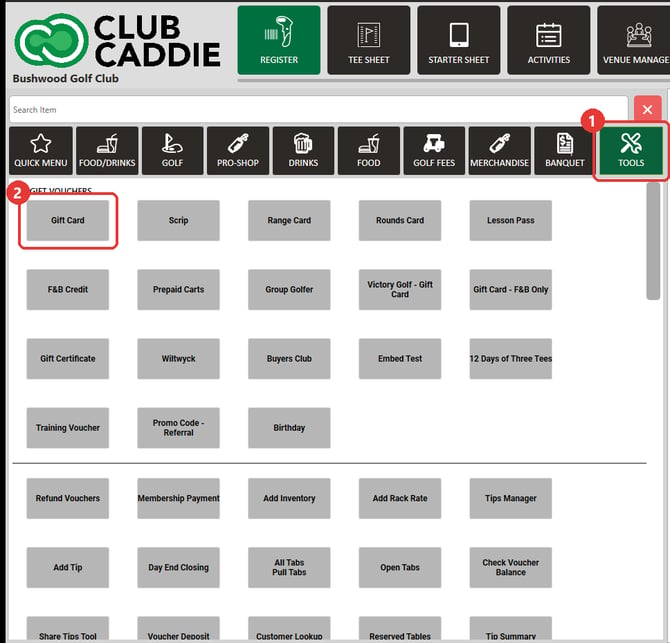
You sell a gift card or another voucher from the TOOLS tab in the Register. Under the GIFT VOUCHERS heading, each tile is a voucher type your club sells at the register, such as Gift Card or Gift Certificate. Clicking a tile opens the GENERATE CREDIT VOUCHER window, where you enter the amount. The voucher goes on the order as a line, and you take payment for it like any other item.
Before you start
A voucher type gets a tile under GIFT VOUCHERS when Available For POS Sale is on for it in Settings under Register Settings, Club Voucher Type. If Available For POS Sale For Specific Roles is also on, the tile shows only for the roles you allow.
Sell a gift card or voucher
- Click REGISTER in the top menu, then click TOOLS on the category bar.
- Under GIFT VOUCHERS, click the tile for the voucher you are selling, such as Gift Card.
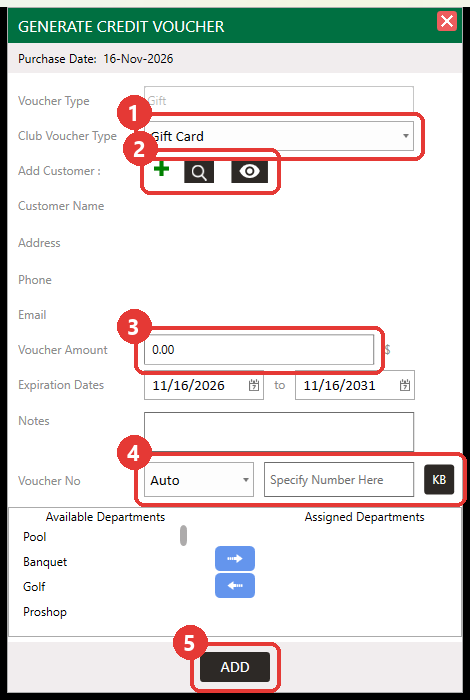
- The GENERATE CREDIT VOUCHER window opens. Check that Club Voucher Type shows the voucher you picked.
- To attach the voucher to a customer, use the icons next to Add Customer :. The plus icon creates a new customer and the search icon finds an existing one. You can also sell the voucher without a customer.
- Enter the amount in Voucher Amount.
- Check the Expiration Dates. They may already be filled in; change them if needed.
- Add Notes if you want to record something about the sale.
- Under Voucher No, leave Auto to have a number created for you. To use your own number, choose Specified and type it in Specify Number Here, or click KB to swipe a card.
- Click ADD. The voucher appears as a line on the order.
- Click Pay and take payment the way you normally do.
Common Questions
Which tile do I click to sell a gift card?
Click the tile named for the voucher type you are selling, such as Gift Card. GIFT VOUCHERS is the heading above the tiles, not a button. If a type has no tile, check that Available For POS Sale is on for it.
How do I add money to a gift card a customer already has?
Use Voucher Deposit on the TOOLS tab instead of a voucher type tile. Enter the existing card's number, click Use to load it, enter the amount to add, then take payment.
How do I check a gift card's balance?
Click Check Voucher Balance on the TOOLS tab.
Can I limit a voucher to certain departments?
Yes. In the GENERATE CREDIT VOUCHER window, move departments from Available Departments to Assigned Departments with the arrow buttons. The voucher then works only when every item in the sale belongs to those departments.