---
title: "Reports : On-Hand Report"
description: Open the On Hand Report on Desktop, read the item, quantity and value columns, and use the Department, Sub Department, Category and Date filters.
---
[Skip to content](https://support.clubcaddie.com/reports-on-hand-report#main-content)
English
Show submenu for translations
[](https://www.clubcaddie.com?hsLang=en)
- [Club Caddie University](https://clubcaddie-university.com/)
- [Webinar Training](https://info.clubcaddie.com/webinarseries?_gl=1*1b7azj6*_gcl_au*NTg3NjE2MDE0LjE3NTczNTEwMDE.*_ga*MTMwODY5ODg2NS4xNzU3MzUxMDAx*_ga_5DSQKC2H56*czE3NTgzMDAwNDAkbzE4JGcwJHQxNzU4MzAwMDQwJGo2MCRsMCRoMA..)
- [Knowledge Base](https://support.clubcaddie.com/)
- [Changelog](https://clubcaddie.com/changelog/)
Open main navigation
Close main navigation
- [Club Caddie University](https://clubcaddie-university.com/)
- [Webinar Training](https://info.clubcaddie.com/webinarseries?_gl=1*1b7azj6*_gcl_au*NTg3NjE2MDE0LjE3NTczNTEwMDE.*_ga*MTMwODY5ODg2NS4xNzU3MzUxMDAx*_ga_5DSQKC2H56*czE3NTgzMDAwNDAkbzE4JGcwJHQxNzU4MzAwMDQwJGo2MCRsMCRoMA..)
- [Knowledge Base](https://support.clubcaddie.com/)
- [Changelog](https://clubcaddie.com/changelog/)
- English
Show submenu for translations
Need help fast? Enter your question and get step-by-step tips.
- There are no suggestions because the search field is empty.
1. [Club Caddie](https://support.clubcaddie.com/?hsLang=en)
2. [Reports](https://support.clubcaddie.com/reports?hsLang=en)
November 5, 2026
# Reports : On-Hand Report
## How to open the On Hand Report on Desktop, read its columns and use its filters and date box.
##### **Overview**
The On Hand Report lists your inventory items with their quantity, wholesale price and value, in groups of rows. Under the heading, a line reads **As of** with the date and time of the report, so a run with no date picked reads as of now. The report has one **Date** box, not a start and an end date.
Watch how to open the On Hand Report in the Club Caddie Desktop app and read an item's Quantity and Value.
##### **Open the On Hand Report**
1. Select the **REPORTS** module from the module navigation menu.
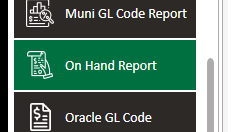
2. Click **On Hand Report** in the left-hand menu.
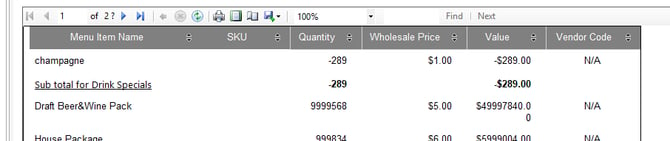
3. The **ON HAND REPORT** opens with the results already loaded. The columns are **Menu Item Name**, **SKU**, **Quantity**, **Wholesale Price**, **Value** and **Vendor Code**. **Sub total for** lines appear between the groups of rows.
##### **Use the filters**
1. Find the filter row above the results. It has a **Search** box, the **Department:**, **Sub Department:** and **Category:** dropdowns that each start on **All**, a **Date:** box with a calendar icon, **Search** and **Clear Search**.

##### **Find the viewer toolbar**
1. Look at the toolbar above the report. It has the page box, **Find** and **Next**, the zoom setting, the print and layout icons and a save icon with a dropdown arrow.
2. The save icon is not labelled Excel.

##### **Common Questions**
**Can I pick a start and end date?**
The On Hand Report shows one **Date** box with a calendar icon, rather than a start and an end date box. The **Date** box takes the place of the Day, Week, Month and Year buttons.
**What does the As of line mean?**
The line under the heading reads **As of** with a date and time. On a run with no date picked, it showed the current date and time.
**Where are the Sub total lines?**
**Sub total for** lines appear between the groups of rows.
**Which filters does the report have?**
A **Search** box, **Department:**, **Sub Department:**, **Category:** and **Date:**. The three dropdowns start on **All**.
- [Browser](https://support.clubcaddie.com/browser?hsLang=en#main-content)
- [Tee Sheet](https://support.clubcaddie.com/browser?hsLang=en#tee-sheet)
- [Register](https://support.clubcaddie.com/browser?hsLang=en#register)
- [Hardware](https://support.clubcaddie.com/browser?hsLang=en#hardware)
- [Vouchers](https://support.clubcaddie.com/browser?hsLang=en#vouchers)
- [Settings](https://support.clubcaddie.com/browser?hsLang=en#settings)
- [Sales](https://support.clubcaddie.com/browser?hsLang=en#sales)
- [Members](https://support.clubcaddie.com/browser?hsLang=en#members)
- [Events](https://support.clubcaddie.com/browser?hsLang=en#events)
- [Troubleshooting](https://support.clubcaddie.com/troubleshooting?hsLang=en)
- [Desktop: Settings](https://support.clubcaddie.com/desktop-settings?hsLang=en#main-content)
- [Venue Center](https://support.clubcaddie.com/desktop-settings?hsLang=en#venue-center)
- [Inventory Center](https://support.clubcaddie.com/desktop-settings?hsLang=en#inventory-center)
- [Manage Roles](https://support.clubcaddie.com/desktop-settings?hsLang=en#manage-roles)
- [Rack Rate Management](https://support.clubcaddie.com/desktop-settings?hsLang=en#rack-rate-management)
- [Membership Settings](https://support.clubcaddie.com/desktop-settings?hsLang=en#membership-settings)
- [Day End Closing](https://support.clubcaddie.com/desktop-settings?hsLang=en#day-end-closing)
- [Course User Info](https://support.clubcaddie.com/desktop-settings?hsLang=en#course-user-info)
- [Clover](https://support.clubcaddie.com/desktop-settings?hsLang=en#clover)
- [Class Management](https://support.clubcaddie.com/desktop-settings?hsLang=en#class-management)
- [POSLink](https://support.clubcaddie.com/desktop-settings?hsLang=en#poslink)
- [Mobile App Builder](https://support.clubcaddie.com/desktop-settings?hsLang=en#mobile-app-builder)
- [Class Rate Management](https://support.clubcaddie.com/desktop-settings?hsLang=en#class-rate-management)
- [3P Integrations](https://support.clubcaddie.com/desktop-settings?hsLang=en#3p-integrations)
- [Punch Card Type Center](https://support.clubcaddie.com/desktop-settings?hsLang=en#punch-card-type-center)
- [Tee Sheet Settings](https://support.clubcaddie.com/desktop-settings?hsLang=en#tee-sheet-settings)
- [Card Connect](https://support.clubcaddie.com/desktop-settings?hsLang=en#card-connect)
- [Floor Plan](https://support.clubcaddie.com/desktop-settings?hsLang=en#floor-plan)
- [General Course Info](https://support.clubcaddie.com/desktop-settings?hsLang=en#general-course-info)
- [Tax Management](https://support.clubcaddie.com/desktop-settings?hsLang=en#tax-management)
- [Terminal Management](https://support.clubcaddie.com/desktop-settings?hsLang=en#terminal-management)
- [Register Settings](https://support.clubcaddie.com/desktop-settings?hsLang=en#register-settings)
- [Payroll Center](https://support.clubcaddie.com/desktop-settings?hsLang=en#payroll-center)
- [I-Frames](https://support.clubcaddie.com/desktop-settings?hsLang=en#i-frames)
- [Event Settings](https://support.clubcaddie.com/desktop-settings?hsLang=en#event-settings)
- [General](https://support.clubcaddie.com/general?hsLang=en)
- [Reports](https://support.clubcaddie.com/reports?hsLang=en)
- [Support](https://support.clubcaddie.com/support?hsLang=en#main-content)
- [Chat AI](https://support.clubcaddie.com/support?hsLang=en#chat-ai)
- [Register](https://support.clubcaddie.com/register?hsLang=en#main-content)
- [Holding Accounts](https://support.clubcaddie.com/register?hsLang=en#holding-accounts)
- [Tools](https://support.clubcaddie.com/register?hsLang=en#tools)
- [Payments](https://support.clubcaddie.com/register?hsLang=en#payments)
- [Tab Management](https://support.clubcaddie.com/register?hsLang=en#tab-management)
- [Tee Sheet](https://support.clubcaddie.com/tee-sheet?hsLang=en#main-content)
- [Tee Sheet Settings](https://support.clubcaddie.com/tee-sheet?hsLang=en#tee-sheet-settings)
- [Starter Sheet](https://support.clubcaddie.com/starter-sheet?hsLang=en)
- [Activities](https://support.clubcaddie.com/activities?hsLang=en#main-content)
- [Activity Center](https://support.clubcaddie.com/activities?hsLang=en#activity-center)
- [Events](https://support.clubcaddie.com/events?hsLang=en#main-content)
- [General](https://support.clubcaddie.com/events?hsLang=en#general)
- [Activity Outing Manager](https://support.clubcaddie.com/events?hsLang=en#activity-outing-manager)
- [Golf League Manager](https://support.clubcaddie.com/events?hsLang=en#golf-league-manager)
- [Online Events](https://support.clubcaddie.com/events?hsLang=en#online-events)
- [Banquet Manager](https://support.clubcaddie.com/events?hsLang=en#banquet-manager)
- [Golf Outing Manager](https://support.clubcaddie.com/events?hsLang=en#golf-outing-manager)
- [On Demand](https://support.clubcaddie.com/on-demand?hsLang=en)
- [Customers](https://support.clubcaddie.com/customers?hsLang=en#main-content)
- [Message Center](https://support.clubcaddie.com/customers?hsLang=en#message-center)
- [CRM](https://support.clubcaddie.com/customers?hsLang=en#crm)
- [Bulletin Board](https://support.clubcaddie.com/customers?hsLang=en#bulletin-board)
- [Members](https://support.clubcaddie.com/members?hsLang=en#main-content)
- [Membership Portal](https://support.clubcaddie.com/members?hsLang=en#membership-portal)
- [Vouchers](https://support.clubcaddie.com/vouchers?hsLang=en#main-content)
- [Credit Books](https://support.clubcaddie.com/vouchers?hsLang=en#credit-books)
- [Punch Cards](https://support.clubcaddie.com/vouchers?hsLang=en#punch-cards)
- [Holding Account](https://support.clubcaddie.com/vouchers?hsLang=en#holding-account)
- [Sales](https://support.clubcaddie.com/sales?hsLang=en)
- [Quickbooks](https://support.clubcaddie.com/quickbooks?hsLang=en#main-content)
- [Quickbooks Desktop](https://support.clubcaddie.com/quickbooks?hsLang=en#quickbooks-desktop)
- [Quickbooks Online](https://support.clubcaddie.com/quickbooks?hsLang=en#quickbooks-online)
- [General](https://support.clubcaddie.com/quickbooks?hsLang=en#general)
- [Hardware](https://support.clubcaddie.com/hardware?hsLang=en#main-content)
- [First American / First Pay](https://support.clubcaddie.com/hardware?hsLang=en#first-american-first-pay)
- [Card Connect](https://support.clubcaddie.com/hardware?hsLang=en#card-connect)
- [Sound Payments / POSLink](https://support.clubcaddie.com/hardware?hsLang=en#sound-payments-poslink)
- [Printer](https://support.clubcaddie.com/hardware?hsLang=en#printer)
- [Clover Connect](https://support.clubcaddie.com/hardware?hsLang=en#clover-connect)
- [Clover Go](https://support.clubcaddie.com/hardware?hsLang=en#clover-go)
- [Food and Beverage App](https://support.clubcaddie.com/food-and-beverage-app?hsLang=en#main-content)
- [Key Features and Procedures](https://support.clubcaddie.com/food-and-beverage-app?hsLang=en#key-features-and-procedures)
- [Mobile App](https://support.clubcaddie.com/mobile-app?hsLang=en)
- [KDS (Kitchen Display System)](https://support.clubcaddie.com/kds-kitchen-display-system?hsLang=en)
- [Video Training](https://support.clubcaddie.com/video-training?hsLang=en#main-content)
- [Membership & Passes](https://support.clubcaddie.com/video-training?hsLang=en#membership-passes)
- [Class Management](https://support.clubcaddie.com/video-training?hsLang=en#class-management)
- [I-Frames](https://support.clubcaddie.com/video-training?hsLang=en#i-frames)
- [Accounting](https://support.clubcaddie.com/video-training?hsLang=en#accounting)
- [Email & SMS Marketing](https://support.clubcaddie.com/email-sms-marketing?hsLang=en#main-content)
- [SMS](https://support.clubcaddie.com/email-sms-marketing?hsLang=en#sms)
- [Email Marketing](https://support.clubcaddie.com/email-sms-marketing?hsLang=en#email-marketing)
- [Uncategorized](https://support.clubcaddie.com/uncategorized?hsLang=en)
- [MCO](https://support.clubcaddie.com/mco?hsLang=en#main-content)
- [Inventory](https://support.clubcaddie.com/mco?hsLang=en#inventory)
[](https://www.clubcaddie.com?hsLang=en)
Award Winning, All-In-One,
Golf Facility Management Software.
[mailto:email@email.com](mailto:email@email.com)
Copyright © 2025, Club Caddie
```json
{
"@context" : "https://schema.org",
"@type" : "VideoObject",
"caption" : {
"@type" : "MediaObject",
"contentUrl" : "https://support.clubcaddie.com/media-transcripts/225200331056/en.vtt",
"inLanguage" : "en",
"name" : "en Captions"
},
"contentUrl" : "https://43947156.fs1.hubspotusercontent-na1.net/hubfs/43947156/video_assets/225200331056/inherited/web_optimized.mp4",
"dateModified" : "2026-10-22T16:43:07.389Z",
"duration" : "PT1M46S",
"height" : 720,
"name" : "video_reports-on-hand-report_training_v1_kb-720p",
"thumbnailUrl" : "https://support.clubcaddie.com/hubfs/kb-pipeline-videos/video_reports-on-hand-report_training_v1_kb-720p.mp4/medium.jpg",
"uploadDate" : "2026-10-22T16:43:00.447Z",
"width" : 1280
}
```