
Overview
The Sales by Item / Sku report lists item sales with the SKU, the department, sub-department and category, the cost and sale price columns, the purchaser and, in the last column, the purchaser's Membership ID. Membership ID shows on rows where the purchaser is a member and is blank on most other rows. This report is its own entry in the Reports list, separate from Sales by Item Report, which has a different set of columns and no Membership ID. For the plain report, see Reports : Sales By Item Report.
Watch how to open the Sales by Item and SKU report in the Club Caddie Desktop app and read the Membership ID column.
Open the Sales by Item / Sku report
- Select the REPORTS module from the module navigation menu.
- On the left-hand menu, select Sales by Item / Sku. Sales by Item Report is a separate entry directly below it.
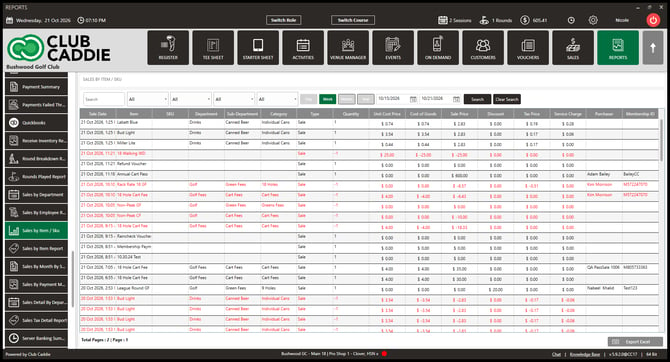
- In our test facility the report opened on Week with the results already loaded. The report is paged, and the page counter is at the bottom.
Read the columns
The report has 16 columns, in this order: Sale Date, Item, SKU, Department, Sub-Department, Category, Type, Quantity, Unit Cost Price, Cost of Goods, Sale Price, Discount, Tax Price, Service Charge, Purchaser and Membership ID.
- Look at the far right of the report for Membership ID, the last column, after Purchaser.
- Read the Membership ID on each row. It shows where the purchaser is a member and is blank on most other rows.
Filter and export
- Find the filter row above the results. It has a Search box, four dropdowns that each start on All, the Day, Week, Month and Year buttons, two date boxes, Search and Clear Search.
- Find the Export Excel button at the bottom right of the report.

Common Questions
Where is the Membership ID column?
It is the last column of Sales by Item / Sku, after Purchaser. The Sales by Item Report entry does not have it.
Why is Membership ID blank on some rows?
Membership ID shows on rows where the purchaser is a member and is blank on most other rows.
What is the difference between Sales by Item / Sku and Sales By Item Report?
They are two separate entries in the Reports list. Sales by Item / Sku has the 16 columns above, including Purchaser and Membership ID. Sales by Item Report has the Course:, Sub Department: and Vendor: filters and the columns Sale Date, Course Name, Department, Sub Department, Category, Item, SKU, Vendor, Unit Price, Wholesale Price and Quantity, with no Purchaser or Membership ID.
Which date range does the report open on?
In our test facility it opened on Week, with the results already loaded.