---
title: "Settings : Add Item to Inventory (Video)"
description: "Article Contents:\n\nThis article summarizes how to create a new item using the Inventory Center found within Settings."
---
[Skip to content](https://support.clubcaddie.com/settings-add-item-to-inventory-video#main-content)
English
Show submenu for translations
[.png?width=200&height=89&name=CC%20%20fiserv.%20(3).png)](https://www.clubcaddie.com?hsLang=en)
- [Club Caddie University](https://clubcaddie-university.com/)
- [Webinar Training](https://info.clubcaddie.com/webinarseries?_gl=1*1b7azj6*_gcl_au*NTg3NjE2MDE0LjE3NTczNTEwMDE.*_ga*MTMwODY5ODg2NS4xNzU3MzUxMDAx*_ga_5DSQKC2H56*czE3NTgzMDAwNDAkbzE4JGcwJHQxNzU4MzAwMDQwJGo2MCRsMCRoMA..)
- [Knowledge Base](https://support.clubcaddie.com/)
- [Changelog](https://clubcaddie.com/changelog/)
Open main navigation
Close main navigation
- [Club Caddie University](https://clubcaddie-university.com/)
- [Webinar Training](https://info.clubcaddie.com/webinarseries?_gl=1*1b7azj6*_gcl_au*NTg3NjE2MDE0LjE3NTczNTEwMDE.*_ga*MTMwODY5ODg2NS4xNzU3MzUxMDAx*_ga_5DSQKC2H56*czE3NTgzMDAwNDAkbzE4JGcwJHQxNzU4MzAwMDQwJGo2MCRsMCRoMA..)
- [Knowledge Base](https://support.clubcaddie.com/)
- [Changelog](https://clubcaddie.com/changelog/)
- English
Show submenu for translations
Need help fast? Enter your question and get step-by-step tips.
- There are no suggestions because the search field is empty.
1. [Club Caddie](https://support.clubcaddie.com/?hsLang=en)
2. [Desktop: Settings](https://support.clubcaddie.com/desktop-settings?hsLang=en)
3. [Inventory Center](https://support.clubcaddie.com/desktop-settings?hsLang=en#inventory-center)
February 24, 2025
# Settings : Add Item to Inventory (Video)
## Article Contents: This article summarizes how to create a new item using the Inventory Center found within Settings.
Step-By-Step
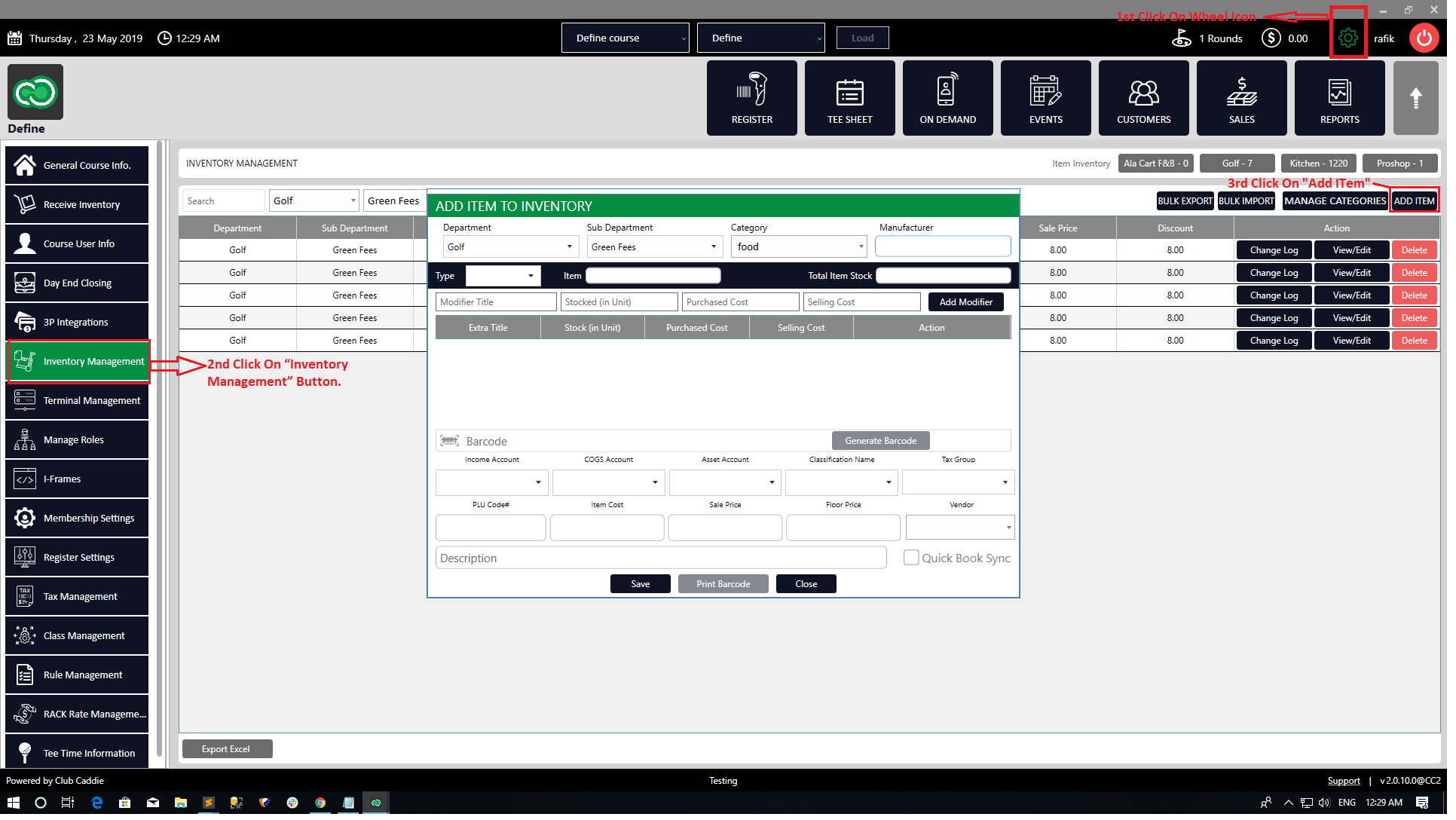
Step 1: Click on the **Gear Wheel** Icon on the top right corner of the screen.
Step 2: Click on the **Inventory Center** button from the left-hand navigation menu
Step 3: Click on the **Add/Manage Items** button at the top of the screen. Next select **ADD ITEM** and the system will generate a pop-up to fill in the following details:
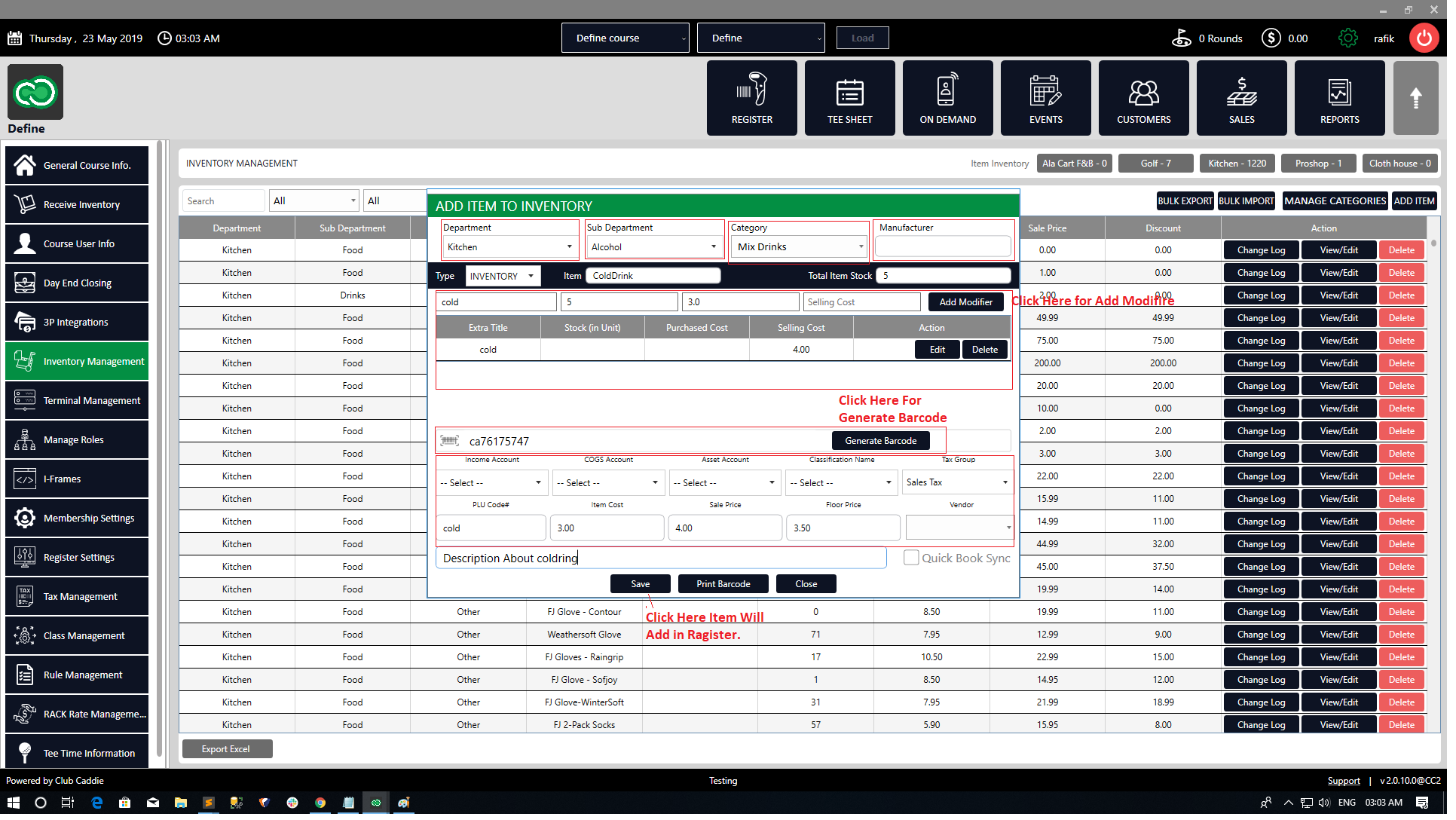
**Department**: Select the department to add an item to from the drop-down.
**Sub Department**: Select the sub-department to add an item to from the drop-down.
**Category:** Select the category to add an item from the drop-down.
**Manufacturer**: Fill in the manufacturer's title/name if the item is produced by a third-party vendor.
**Type**: Select **Inventory** from the list of options in the drop-down.
**Item**: Fill in the title/name of the item.
**Total Item Cost**: Fill in the quantity of the item which is available.
**Add Modifier**: The item can be customized with additional fees, or even reducing the fees if the modifier is applied. A modifier can also be edited and/or deleted.
**Barcode**: A pre-labeled barcode on an item can be scanned into the system. A barcode can also be generated from the software **Avery** provided for non-labeled items.
**Item Cost**: Fill in the amount which is incurred to prepare the item.
**Sale Price**: Fill in the selling amount for the item. The sales price input will be exclusive of any taxes. Taxes will be added on top as per the product and tax policies.
**Floor Price**: Fill in the amount that the item cannot be discounted below. This price will be the minimum price the item can be sold for.
**Tax Group**: Select the Tax Group from the drop-down as per the tax applicable for this particular item.
**Description:** A description of the product can be added if needed.
**Vendor**: If the product is procured from a specific vendor, this drop-down can be used to select it.
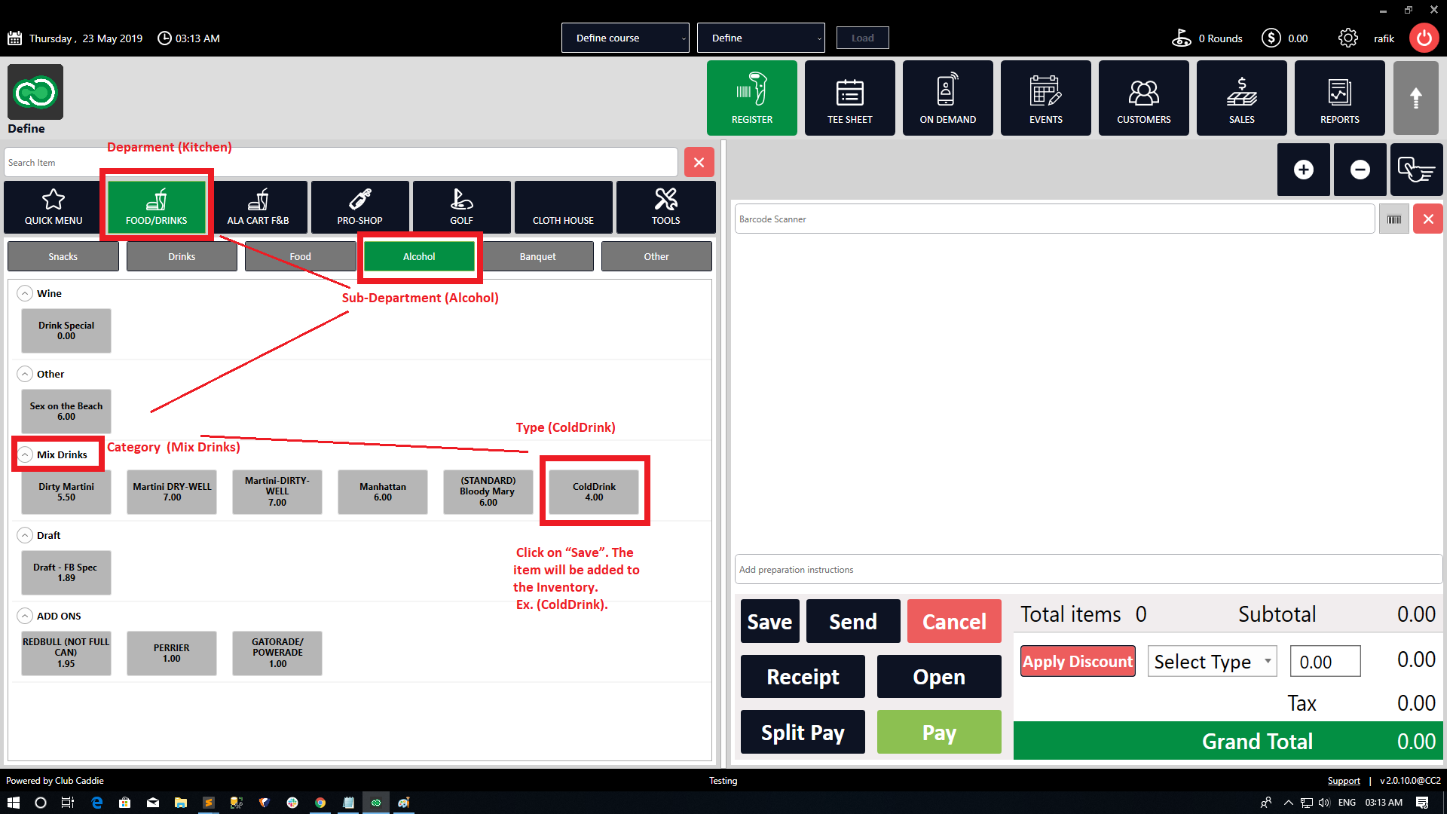
Step 4: Once the required information has been added, click on **Save** and the system will add the item to the Inventory. You can further edit the item from the inventory list by following the same steps mentioned above and editing the fields that are needed. For example, changing the department, vendor etc..
- [Browser](https://support.clubcaddie.com/browser?hsLang=en#main-content)
- [Tee Sheet](https://support.clubcaddie.com/browser?hsLang=en#tee-sheet)
- [Register](https://support.clubcaddie.com/browser?hsLang=en#register)
- [Hardware](https://support.clubcaddie.com/browser?hsLang=en#hardware)
- [Vouchers](https://support.clubcaddie.com/browser?hsLang=en#vouchers)
- [Settings](https://support.clubcaddie.com/browser?hsLang=en#settings)
- [Sales](https://support.clubcaddie.com/browser?hsLang=en#sales)
- [Members](https://support.clubcaddie.com/browser?hsLang=en#members)
- [Events](https://support.clubcaddie.com/browser?hsLang=en#events)
- [Troubleshooting](https://support.clubcaddie.com/troubleshooting?hsLang=en)
- [Desktop: Settings](https://support.clubcaddie.com/desktop-settings?hsLang=en#main-content)
- [Venue Center](https://support.clubcaddie.com/desktop-settings?hsLang=en#venue-center)
- [Inventory Center](https://support.clubcaddie.com/desktop-settings?hsLang=en#inventory-center)
- [Manage Roles](https://support.clubcaddie.com/desktop-settings?hsLang=en#manage-roles)
- [Rack Rate Management](https://support.clubcaddie.com/desktop-settings?hsLang=en#rack-rate-management)
- [Membership Settings](https://support.clubcaddie.com/desktop-settings?hsLang=en#membership-settings)
- [Day End Closing](https://support.clubcaddie.com/desktop-settings?hsLang=en#day-end-closing)
- [Course User Info](https://support.clubcaddie.com/desktop-settings?hsLang=en#course-user-info)
- [Clover](https://support.clubcaddie.com/desktop-settings?hsLang=en#clover)
- [Class Management](https://support.clubcaddie.com/desktop-settings?hsLang=en#class-management)
- [POSLink](https://support.clubcaddie.com/desktop-settings?hsLang=en#poslink)
- [Mobile App Builder](https://support.clubcaddie.com/desktop-settings?hsLang=en#mobile-app-builder)
- [Class Rate Management](https://support.clubcaddie.com/desktop-settings?hsLang=en#class-rate-management)
- [3P Integrations](https://support.clubcaddie.com/desktop-settings?hsLang=en#3p-integrations)
- [Punch Card Type Center](https://support.clubcaddie.com/desktop-settings?hsLang=en#punch-card-type-center)
- [Tee Sheet Settings](https://support.clubcaddie.com/desktop-settings?hsLang=en#tee-sheet-settings)
- [Card Connect](https://support.clubcaddie.com/desktop-settings?hsLang=en#card-connect)
- [Floor Plan](https://support.clubcaddie.com/desktop-settings?hsLang=en#floor-plan)
- [General Course Info](https://support.clubcaddie.com/desktop-settings?hsLang=en#general-course-info)
- [Tax Management](https://support.clubcaddie.com/desktop-settings?hsLang=en#tax-management)
- [Terminal Management](https://support.clubcaddie.com/desktop-settings?hsLang=en#terminal-management)
- [Register Settings](https://support.clubcaddie.com/desktop-settings?hsLang=en#register-settings)
- [Payroll Center](https://support.clubcaddie.com/desktop-settings?hsLang=en#payroll-center)
- [I-Frames](https://support.clubcaddie.com/desktop-settings?hsLang=en#i-frames)
- [Event Settings](https://support.clubcaddie.com/desktop-settings?hsLang=en#event-settings)
- [General](https://support.clubcaddie.com/general?hsLang=en)
- [Reports](https://support.clubcaddie.com/reports?hsLang=en)
- [Support](https://support.clubcaddie.com/support?hsLang=en#main-content)
- [Chat AI](https://support.clubcaddie.com/support?hsLang=en#chat-ai)
- [Register](https://support.clubcaddie.com/register?hsLang=en#main-content)
- [Holding Accounts](https://support.clubcaddie.com/register?hsLang=en#holding-accounts)
- [Tools](https://support.clubcaddie.com/register?hsLang=en#tools)
- [Payments](https://support.clubcaddie.com/register?hsLang=en#payments)
- [Tab Management](https://support.clubcaddie.com/register?hsLang=en#tab-management)
- [Tee Sheet](https://support.clubcaddie.com/tee-sheet?hsLang=en#main-content)
- [Tee Sheet Settings](https://support.clubcaddie.com/tee-sheet?hsLang=en#tee-sheet-settings)
- [Starter Sheet](https://support.clubcaddie.com/starter-sheet?hsLang=en)
- [Activities](https://support.clubcaddie.com/activities?hsLang=en#main-content)
- [Activity Center](https://support.clubcaddie.com/activities?hsLang=en#activity-center)
- [Events](https://support.clubcaddie.com/events?hsLang=en#main-content)
- [General](https://support.clubcaddie.com/events?hsLang=en#general)
- [Activity Outing Manager](https://support.clubcaddie.com/events?hsLang=en#activity-outing-manager)
- [Golf League Manager](https://support.clubcaddie.com/events?hsLang=en#golf-league-manager)
- [Online Events](https://support.clubcaddie.com/events?hsLang=en#online-events)
- [Banquet Manager](https://support.clubcaddie.com/events?hsLang=en#banquet-manager)
- [Golf Outing Manager](https://support.clubcaddie.com/events?hsLang=en#golf-outing-manager)
- [On Demand](https://support.clubcaddie.com/on-demand?hsLang=en)
- [Customers](https://support.clubcaddie.com/customers?hsLang=en#main-content)
- [Message Center](https://support.clubcaddie.com/customers?hsLang=en#message-center)
- [CRM](https://support.clubcaddie.com/customers?hsLang=en#crm)
- [Bulletin Board](https://support.clubcaddie.com/customers?hsLang=en#bulletin-board)
- [Members](https://support.clubcaddie.com/members?hsLang=en#main-content)
- [Membership Portal](https://support.clubcaddie.com/members?hsLang=en#membership-portal)
- [Vouchers](https://support.clubcaddie.com/vouchers?hsLang=en#main-content)
- [Credit Books](https://support.clubcaddie.com/vouchers?hsLang=en#credit-books)
- [Punch Cards](https://support.clubcaddie.com/vouchers?hsLang=en#punch-cards)
- [Holding Account](https://support.clubcaddie.com/vouchers?hsLang=en#holding-account)
- [Sales](https://support.clubcaddie.com/sales?hsLang=en)
- [Quickbooks](https://support.clubcaddie.com/quickbooks?hsLang=en#main-content)
- [Quickbooks Desktop](https://support.clubcaddie.com/quickbooks?hsLang=en#quickbooks-desktop)
- [Quickbooks Online](https://support.clubcaddie.com/quickbooks?hsLang=en#quickbooks-online)
- [General](https://support.clubcaddie.com/quickbooks?hsLang=en#general)
- [Hardware](https://support.clubcaddie.com/hardware?hsLang=en#main-content)
- [First American / First Pay](https://support.clubcaddie.com/hardware?hsLang=en#first-american-first-pay)
- [Card Connect](https://support.clubcaddie.com/hardware?hsLang=en#card-connect)
- [Sound Payments / POSLink](https://support.clubcaddie.com/hardware?hsLang=en#sound-payments-poslink)
- [Printer](https://support.clubcaddie.com/hardware?hsLang=en#printer)
- [Clover Connect](https://support.clubcaddie.com/hardware?hsLang=en#clover-connect)
- [Clover Go](https://support.clubcaddie.com/hardware?hsLang=en#clover-go)
- [Food and Beverage App](https://support.clubcaddie.com/food-and-beverage-app?hsLang=en#main-content)
- [Key Features and Procedures](https://support.clubcaddie.com/food-and-beverage-app?hsLang=en#key-features-and-procedures)
- [Mobile App](https://support.clubcaddie.com/mobile-app?hsLang=en)
- [Email Marketing](https://support.clubcaddie.com/email-marketing?hsLang=en)
- [KDS (Kitchen Display System)](https://support.clubcaddie.com/kds-kitchen-display-system?hsLang=en)
- [Video Training](https://support.clubcaddie.com/video-training?hsLang=en#main-content)
- [Membership & Passes](https://support.clubcaddie.com/video-training?hsLang=en#membership-passes)
- [Class Management](https://support.clubcaddie.com/video-training?hsLang=en#class-management)
- [I-Frames](https://support.clubcaddie.com/video-training?hsLang=en#i-frames)
- [Accounting](https://support.clubcaddie.com/video-training?hsLang=en#accounting)
- [Club Caddie Managed Marketing](https://support.clubcaddie.com/club-caddie-managed-marketing?hsLang=en#main-content)
- [SMS](https://support.clubcaddie.com/club-caddie-managed-marketing?hsLang=en#sms)
- [Email Marketing](https://support.clubcaddie.com/club-caddie-managed-marketing?hsLang=en#email-marketing)
- [Uncategorized](https://support.clubcaddie.com/uncategorized?hsLang=en)
- [MCO](https://support.clubcaddie.com/mco?hsLang=en#main-content)
- [Inventory](https://support.clubcaddie.com/mco?hsLang=en#inventory)
[](https://www.clubcaddie.com?hsLang=en)
Award Winning, All-In-One,
Golf Facility Management Software.
[mailto:email@email.com](mailto:email@email.com)
Copyright © 2025, Club Caddie