
Overview
Print Starter Receipts is a Register setting. Turn it on if you want a starter receipt to print, and leave it off if you do not.
Find the Print Starter Receipts setting in Register Settings in the Desktop POS and see whether it is on.
Turn starter receipts on or off
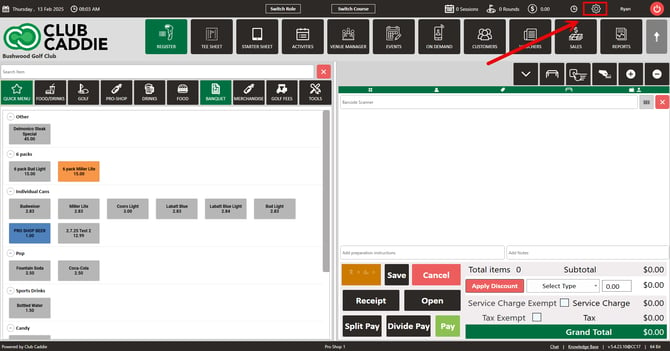
- Click the gear icon in the top right corner of the software.
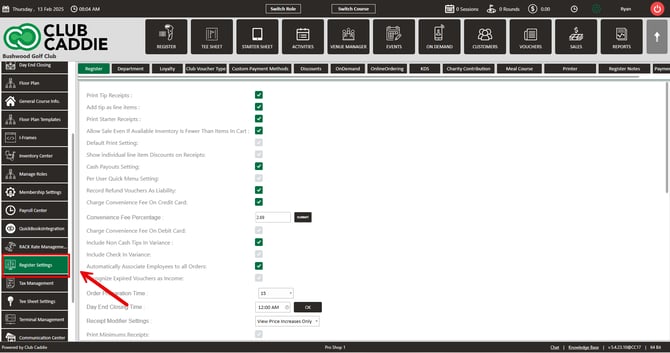
- Click Register Settings in the left menu. If you do not see it, scroll down the left menu.
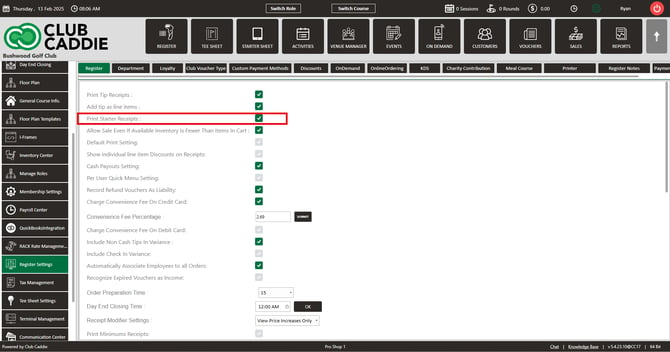
- On the Register tab, find Print Starter Receipts :. It is the third row, below Print Tip Receipts and Add tip as line items. Check the box to print a starter receipt. Leave it unchecked if you do not want one.
Common Questions
Where is the Print Starter Receipts setting?
In Register Settings, on the Register tab, in the third row.
Where is Register Settings in the left menu?
Scroll down the left menu.