.png?width=200&height=89&name=CC%20%20fiserv.%20(3).png)
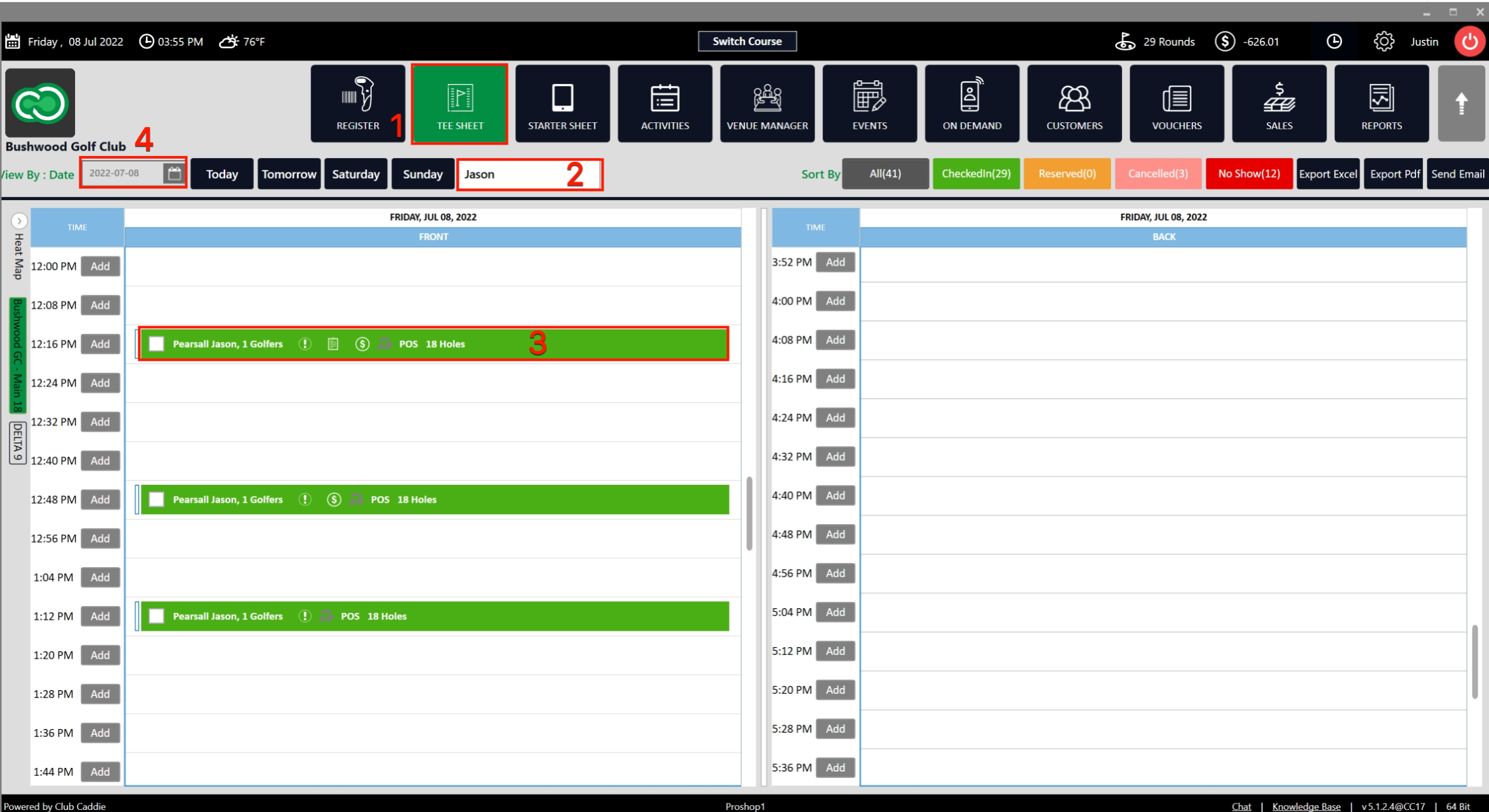
Step 1: To search for a player on the Tee Sheet, navigate to the Tee Sheet module, then type the player's name into the Player Name search box near the Select Current Date button. The tee sheet will immediately filter to show that player's reservation time slot for the selected date.Navigate to the TEE SHEET module from the top navigation bar (1).
Step 2: Near the Select Current Date button you will find the Player Name Search Box (2).
Step 3: Type the player's name into the Player Name search box. The search box supports a Last Name, First Name format — typing a comma between the last and first name filters results to match both, giving you a shorter, more targeted list. Without the comma, the system treats the entire entry as a single search term. Once you submit the name, the tee sheet displays the reservation time slot for that player on the current date (3).
"Last Name, First Name" search format. By typing a comma between the last and first name, the system filters results to match both — giving you a much shorter, more targeted list. The comma is the key — without it, the system treats the entire entry as a single search term.
Step 4: To search on a different date, select a date from View By Date (4) and then fill in the Player Name Search Box. The tee sheet will show the reservation time slot for that particular player and date.