.png?width=200&height=89&name=CC%20%20fiserv.%20(3).png)
Step-by-Step:
Step 1: Go to the Tee Sheet and find the tee time you want to review.
Step 2: Hover over the tee-time cell and right-click.
Step 3: Select View Changelog at the bottom of the menu.
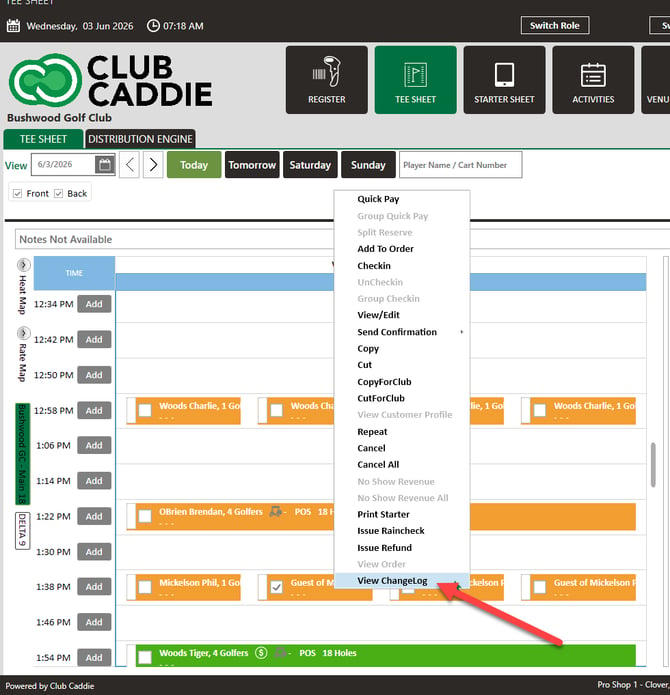
Step 4: Review the list of entries. It starts with when the booking was first added, and shows each change after that — including the staff member who made it and the time it happened.
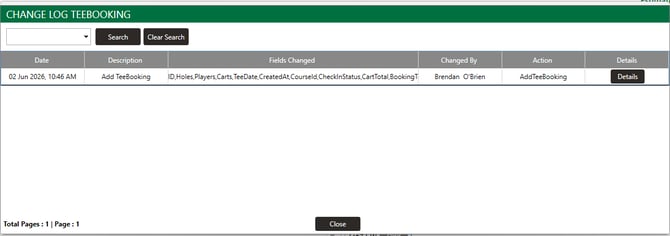
Step 5: Click Details on any entry to see the specifics (for example, a tee time moved from 1:00 to 1:30).