.png?width=200&height=89&name=CC%20%20fiserv.%20(3).png)
Overview
Distribution is payout day. The pot's full, you know who won, and you're splitting the balance among them. Each winner ends up with their own credit book voucher, created the moment you click Pay.
You'll usually do this once per event, in one sitting, with all your winners in front of you.
Before you start
Your role needs the Credit Books Tool permission. Without it, the CREDIT BOOKS section doesn't show under TOOLS at all. An admin turns it on at SETTINGS → Manage Roles, then the role's menu → Edit Permissions → POS Section → Register → Credit Books Tool.
Have your payout list ready: who's getting paid, and how much each. The distribution screen takes every winner at once, so working from a finished list is faster.
Check the pot balance at VOUCHERS → Credit Book Vouchers → Holding Account. Your payouts can't add up to more than that.
Distribute the pot
- Open the REGISTER module.
- Click TOOLS, then find the CREDIT BOOKS section and click Credit Book Distribution.
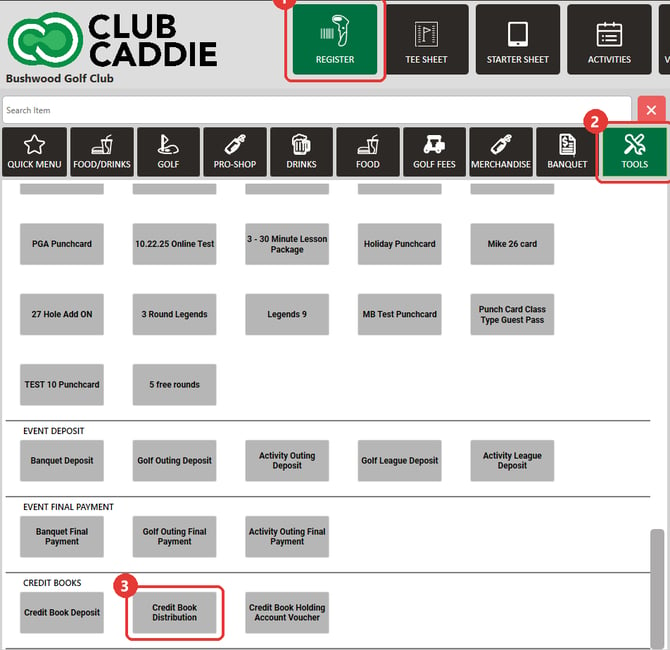
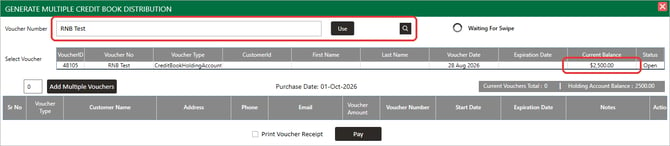
- Select the Holding Account you're paying out from, using the search icon at the top of the window. Its Current Balance shows once it's selected.
- Type the number of winners into the small box next to Add Multiple Vouchers (it starts at zero), then click the button. You get one row per winner. Enter the full count before you click, because clicking it again clears any rows you've already filled in.
- Fill in each row:
- Customer Name: use the + to create a new customer profile, or the magnifier to search for an existing one.
- Voucher Amount: what this person gets.
- Voucher Number: leave it blank. Club Caddie generates a number and creates a new credit book voucher for the winner.
- Start Date: defaults to today.
- Expiration Date: optional. It shows No Expiry Date unless your Credit books voucher type has an expiration rule, in which case that date is filled in. Check it before you click Pay.
- Notes: worth filling in. "2nd place, Member-Guest 2026" explains the credit to whoever looks at it later.
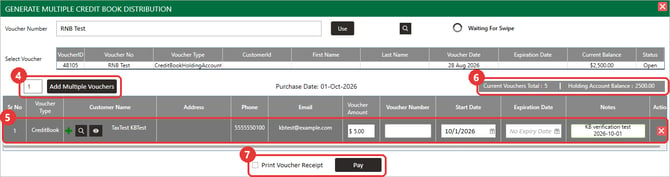
- Check your amounts against the pot. The window shows a running Current Vouchers Total next to the Holding Account Balance.
- Tick Print Voucher Receipt if your winners want something on paper, then click Pay.
After the payout
Each winner's new credit book voucher shows up under VOUCHERS → Credit Book Vouchers → CreditBook, dated with the Start Date you set (today, unless you changed it) and carrying the amount you gave them. From there you can open any of them to edit, view, or check usage.

A winner who already has a credit book still gets a new voucher when Voucher Number is left blank, so someone who wins twice ends up with two vouchers. If Club Caddie offers to apply the payout to a credit book the winner already has, choose No to keep it as a new voucher.
The Holding Account stays in the Holding Account tab, with its balance reduced by exactly what you paid out.
See also: Register: Credit Book Holding Accounts · Creating a Credit Book Holding Account · Deposit Money into Holding Account
Common Questions
Can I pay out more than the pot holds?
No. Pay is blocked and you'll see Holding account balance is Insufficient!.
What does Pay need before it goes through?
A Holding Account picked, at least one row, an amount above zero on every row, and any expiration date set after its start date. The payouts also can't add up to more than the balance.
Do I have to distribute the whole balance at once?
No. Pay out what you need and leave the rest in the account for a later distribution.
What if a winner isn't in the system yet?
Use the + on their row to create the customer profile without leaving the distribution screen.
Where can a winner spend their credit?
Each winner's voucher gets the departments assigned to the Credit books voucher type in your club's voucher settings. That's a central setting, not something you choose per payout.
Does the payout ring up at the register?
Not on the open order. Pay inside the distribution window posts the payout as its own order and leaves whatever's open at the till alone. You can find it by its Order ID in the Holding Account's Usage history.