.png?width=200&height=89&name=CC%20%20fiserv.%20(3).png)
Overview
Club Caddie adds sales tax on top of the price you enter. Tax is worked out one unit at a time and one tax at a time: the price of one unit times each tax rate, rounded to the nearest cent, then multiplied by the quantity.
The price you enter is always the price before tax, including the rate price on a rack rate. So when you want a customer to pay an even amount, like $5.00 or $60.00, you enter the pre-tax price that gets you there. This article shows how to do that for a single item and for a rack rate, how to check a rate's pieces when its total isn't the one you planned, and how to tell whether service charges are taxed. The examples use a 7% tax rate; the steps are the same for any rate.
Before you start
Know which tax applies to what you're pricing:
- Inventory items (merchandise, food and beverage, cart fees) use the item's own Tax Group.
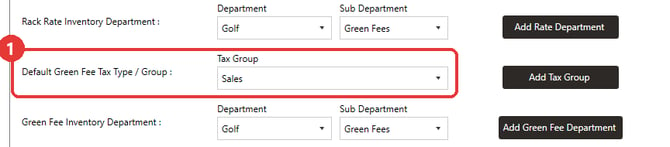
- The green fee portion of a rack rate uses the green fee item's own Tax Group. When a rate creates a new green fee item for you, that item starts with the Default Green Fee Tax Type / Group from Tee Sheet Settings.
- Other items built into a rack rate each use their own Tax Group.
- Service charges are covered in the last section.
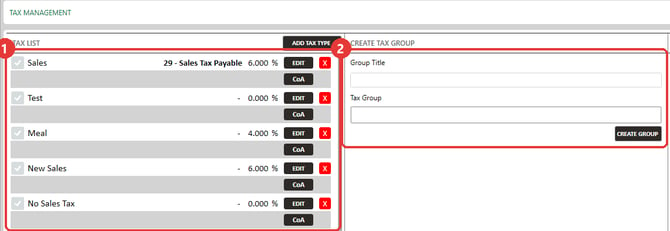
Tax rates and tax groups are set up in Settings → Tax Management. See Settings : Tax Management Overview for setup.
Price an item so the total comes out even
This works for any item you sell: a drink, a snack, a sleeve of balls, a range bucket.
- Decide what the customer should pay, for example $5.00.
- Divide it by 1 plus your tax rate. At 7%, $5.00 ÷ 1.07 = $4.673. If the item's tax group holds more than one tax, use the combined rate.
- Round to the nearest cent and enter that as the item's price: $4.67.
- Check it: $4.67 × 7% = $0.327, which rounds to $0.33. $4.67 + $0.33 = $5.00.
- If the check misses, try one cent higher or lower. A few totals can't be reached exactly: at 7%, a $11.21 price totals $11.99 and a $11.22 price totals $12.01. Pick the one that lands closest, or choose a different target.
Because tax is rounded on each unit, an item priced this way stays even at any quantity when it sells at full price. Four of them collect $0.33 × 4 = $1.32 in tax, for a total of $20.00.
Price a rack rate so the total comes out even
The Rate ($) you enter on a rack rate is the amount before tax. Club Caddie splits it across the rate's items in this order, then adds tax to each item that is taxed:
- The cart fee.
- Any other item in the combo.
- The green fee, which gets whatever is left.
So to land on an even total, back the tax out of the taxed items only, then enter the pre-tax result in Rate ($).
Example: the cart fee has no tax and the green fee is taxed at 7%
Golfers should pay $60.00. The cart fee is $20.00 with no tax.
- Take the untaxed cart fee out of the total. $60.00 minus $20.00 leaves $40.00 for the green fee, tax included.
- Back the tax out of that. $40.00 ÷ 1.07 = $37.383, so the green fee is $37.38. Its tax is $2.62.
- Add the cart fee back. $37.38 + $20.00 = $57.38. That is your rate price.
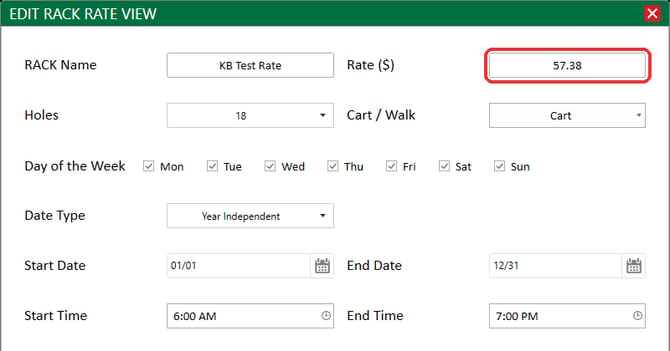
- Go to Settings → RACK Rate Management, click EDIT on the rate, and enter 57.38 in Rate ($).
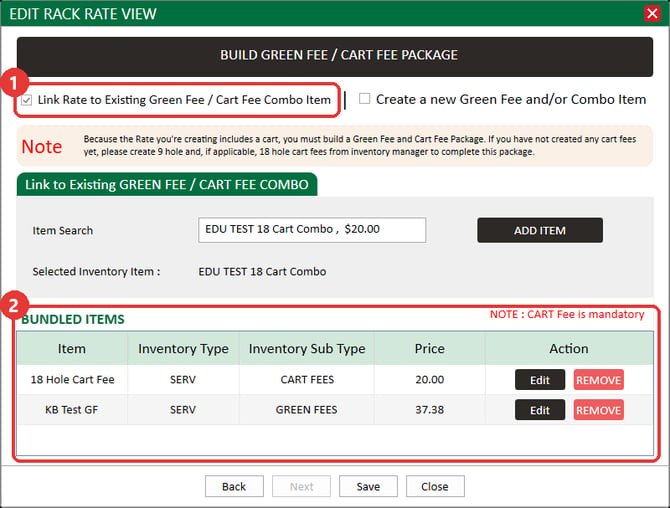
- Click Next. Under BUNDLED ITEMS, the 18 Hole Cart Fee shows $20.00 and the green fee shows $37.38. The combo in this example has its green fee set to $0.00; the rate fills in the $37.38 it leaves for the green fee.
- Click Save.
- Book a test tee time on the rate without sending a confirmation, then check it in. At the register, the ticket shows a subtotal of $57.38, tax of $2.62 and a total of $60.00. Then delete the line without taking payment, and cancel the test booking.
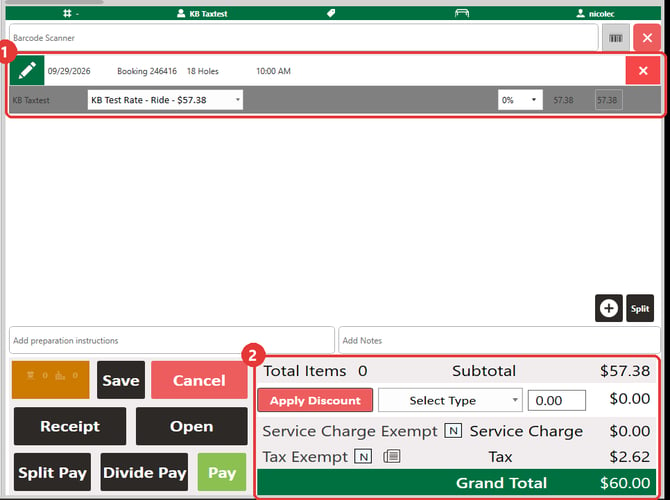
The golfer pays $60.00 because Club Caddie adds $2.62 of tax on top of the $57.38 rate.
Example: the cart fee is taxed too
Golfers should pay $50.00. The cart fee is $20.00, and both the cart fee and the green fee are taxed at 7%.
- Add tax to the cart fee. $20.00 + $1.40 = $21.40.
- Take that out of the total. $50.00 minus $21.40 leaves $28.60 for the green fee, tax included.
- Back the tax out of that. $28.60 ÷ 1.07 = $26.729, so the green fee is $26.73. Its tax is $1.87.
- Add the cart fee back at its pre-tax price. $26.73 + $20.00 = $46.73. Enter that in Rate ($).
Because each piece is rounded on its own, totals step in whole cents. With a $20.00 cart fee taxed at 7%, a rate of $56.07 rings up $59.99 and a rate of $56.08 rings up $60.01, so choose the total that lands where you want it.
The same steps work for any rate
For any mix of pieces, work through these steps:
Step 1: Start with the total the golfer should pay.
Step 2: Subtract each untaxed piece at its price.
Step 3: Subtract each taxed piece except the green fee at its price plus its tax, rounded to the cent.
Step 4: Divide what is left by 1 plus the green fee's tax rate. That is the green fee. If the green fee has no tax, what is left is the green fee.
Step 5: Add the pieces back at their pre-tax prices. That is your Rate ($).
Step 6: Ring up a test booking. If the total is a cent off, raise or lower Rate ($) by a cent.
If a piece is on a different tax group, use that group's rate for that piece. If you change a piece's price, work through the steps again to find the new rate price.
Build from the combo
You can also start from the combo. If you already know each piece's pre-tax price (the green fee comes from step 4 above), set the cart fee, any other items and the green fee to those prices and add them up. In the first example, $20.00 + $37.38 = $57.38, which is the price to enter in Rate ($).
Or set the combo's green fee to $0.00 and let each rate supply it. The rate's price still sets the total, so use the steps above to find it. The register charges the rate's price, not the combo's own price.
When you save a rate, Club Caddie records the leftover amount as the combo's green fee price, so the green fee price you see in the combo can change after you save. The rate keeps its own price.
Tips for a rate's items
- Set the green fee item's sub type to GREEN FEES. The rate can only find the item as a green fee when this is set. You can check it in the rate's Inventory Sub Type column. If you change it on an item that's already in a combo, remove the item from the combo and add it back.
- Name combos clearly. Adding "Combo" to a combo's name makes the right one easy to pick in Item Search.
- Reuse one combo across rates. Set each rate's own price in Rate ($). The green fee absorbs the difference, so the other items keep their combo prices.
- Combo prices can differ from regular prices, as long as they aren't below the item's floor price.
Land a rate on the total you planned
If a rate rings up a few cents above or below the total you planned, check each piece of it.
- Go to Settings → RACK Rate Management, click EDIT on the rate, and click Next. Note each item under BUNDLED ITEMS and its price.
- Go to Settings → Inventory Center. For each of those items, open its ⋮ menu, click View / Edit, and check Tax Group on the Details tab. A cart fee you expected to be untaxed may be on a tax group that charges tax, or the green fee may be on a different group than you planned.
- If your tax rate changed and you set up a new tax group for it, make sure each item is on the new group. Each item is taxed with the tax group it's on, so an item left on the old group still charges the old rate.
- Move any item that's on the wrong group to the right one and click Update.
- Book a new test tee time on the rate and ring it up, the same way as step 7 in the section above. Use a new booking, because existing tee times keep the price they were booked with.
- If every tax group is right and the new booking is still a cent or two off, it's rounding. Each piece of a rate is rounded on its own, so the pieces can add up to a cent or two more or less than your math on the full rate. Raise or lower Rate ($) by a cent and ring up a new booking again. Contact support for help landing on the total you want.
Check whether a service charge is taxed
A service charge is worked out per unit and rounded to the cent, the same way tax is. Whether the service charge is also taxed is one register setting.
- Go to Settings → Register Settings.
- On the Register tab, find Tax on Service Charge :. When it's checked, service charges are taxed.
- Check Inventory Service Charge Tax Group. Club Caddie taxes a service charge with the service charge tax group set on the item, and uses this one when the item doesn't have one.
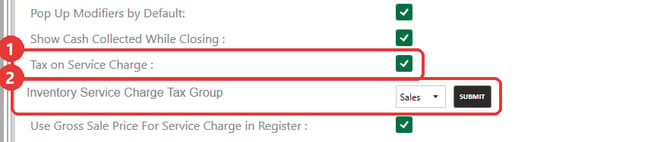
For example, here is a $100.00 item with a 20% service charge and 7% tax, with Tax on Service Charge : checked:
- Service charge: $100.00 × 20% = $20.00
- Tax on the item: $100.00 × 7% = $7.00
- Tax on the service charge: $20.00 × 7% = $1.40
- The customer pays $128.40
With the setting unchecked, the same sale totals $127.00.
Common Questions
Is the rate price the amount the golfer pays?
No. The Rate ($) is the amount before tax. Club Caddie adds tax on top at the register, so a $57.38 rate with $2.62 of tax rings up as $60.00.
Can I enter prices with tax already included?
Prices are entered before tax, and Club Caddie adds tax at the register. Use the steps in "Price an item so the total comes out even" to find the pre-tax price for the total you want.
Why does Club Caddie calculate tax per unit instead of on the subtotal?
Club Caddie rounds tax on each unit, not on the subtotal, so the two can differ by a few cents, and by more on large quantities. For example, four items at $4.67 collect $1.32 in tax, while 7% of the $18.68 subtotal is $1.31. See General : Understanding Sales Tax in Club Caddie for why tax is calculated item by item.
What if my tax group has more than one tax, like a state tax and a local tax?
Each tax is rounded on its own and then added together. Use the combined rate when you back the tax out of a price.
Do existing tee times change when I change a rate?
No. Tee times keep the price they were booked with, including bookings made online. New bookings use the new price.
What does the tax percentage on a sales tax report show?
The report divides the tax collected by sales. Because each unit is rounded to the cent, low-priced items can collect a fraction of a cent more or less than the exact rate. For example, $0.33 on a $4.67 item works out to 7.07%. Your configured rate hasn't changed.
Can Club Caddie round totals up to the nearest dollar?
Totals follow your prices to the cent. To get whole-dollar totals, set prices with the steps above and ring up each rate once to confirm its total. For cash payments, see Settings : Cash Rounding.
Our tax rate changed. What do I do?