.png?width=200&height=89&name=CC%20%20fiserv.%20(3).png)
Loyalty points give customers a reason to come back. Three settings decide how the program works: how points are earned, which customers earn them, and how each item is configured. This article explains those layers, the rules worth knowing, and what happens to points when a sale is refunded or a round is rained out.
Turn loyalty on
Every setting below lives on the Loyalty tab under Settings → Register Settings. To turn the program on, follow Settings : Register Settings : How to enable loyalty points.
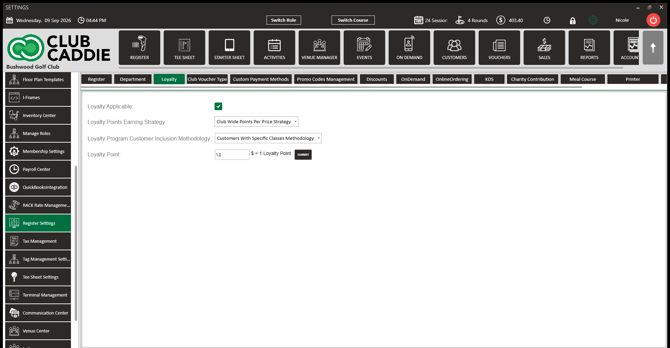
1. How customers earn points: Loyalty Points Earning Strategy
The Loyalty Points Earning Strategy : dropdown controls how points are calculated across the whole facility. Two options:
Club Wide Points Per Price Strategy — every eligible customer earns the same rate on everything. Enter the dollar amount that earns one point in Loyalty Point : (the label beside it reads $ = 1 Loyalty Point). Points are calculated from the check total. This is the simplest model.
Inventory Specific Strategy — points are set per item. Each item earns a fixed number of points or points based on its price. The register setting is the master switch: with Inventory Specific selected, an item with no Loyalty Earned Type earns zero points even if a number sits in Loyalty Earned. Setup: Register Settings: Loyalty Points - Inventory Specific Item Earning.
2. Who earns points: Loyalty Program Customer Inclusion Methodology
Whichever earning strategy you use, the Loyalty Program Customer Inclusion Methodology : dropdown decides who is eligible:
Club Wide Customers Methodology — all customers earn.
Customers With Specific Classes Methodology — only customers in classes marked Eligible For Loyalty earn. Set that per class in Settings → Class Management (Action → Edit Class). A customer with no eligible class earns zero, even on items set up to earn. Setup: Register Settings: Loyalty Points - Customers With Specific Classes.
A sub-member whose own class is not eligible earns through the primary member's class, and the points land on the sub-member's own balance.
3. How points are configured on items
Under Inventory Specific Strategy each item carries three fields on its Details tab: Loyalty Earned Type (Fixed or Point Per Dollar), Loyalty Earned, and Loyalty Redemption. Reach them from Settings → Inventory Center, or right-click the item in the Register and choose Edit Inventory. Both open the same window. Setup: Settings : Setting or Adjusting an Item's Loyalty Points.
4. Combo items
A combo earns points through the items inside it. The combo record has no loyalty fields of its own. Set Loyalty Earned Type and Loyalty Earned on each component item, and a combo sale earns the sum of what those components earn. Under Inventory Specific Strategy, a combo whose components have no loyalty type set earns nothing.
5. What happens to points on a refund, rain check, or cancellation
- Refund: Only the points earned by the refunded items are removed. Refunding one item from a five-item sale takes back that item's points, not the whole order's.
- Rain check on a round paid with points: The points come back in proportion to the holes not played. A 9-hole rain check on an 18-hole round returns half the points, including on a round that was paid entirely with points.
- Rain check or refund of an item earning Fixed points: The points removed are prorated to the amount refunded.
- Online cancellation: Canceling an online tee booking reverses the loyalty on that booking.
- Group bookings: Points are redeemed per player checked in, and the order can be refunded from loyalty.
Key rules to know
- The register setting overrides item settings. Item-level loyalty only applies under Inventory Specific Strategy.
- Paying with points earns zero new points on that transaction.
- A customer must be on the check. Points only apply when a customer profile is attached to the transaction.
- Combo items earn through their components (section 4).
Common questions
Why did a customer earn zero points?
Check three things in order: the customer is attached to the check; under Customers With Specific Classes Methodology the customer has a class marked Eligible For Loyalty; under Inventory Specific Strategy every item bought has a Loyalty Earned Type.
Can I combine Inventory Specific earning with class-only eligibility?
Yes. The two dropdowns are independent. Eligibility decides whether the customer earns at all; the strategy decides how much.
Where do staff and customers see points?
At the Register, points show once a customer is attached and a loyalty item is added, and Loyalty appears as a payment method at Pay. History is under the customer's profile (Loyalty History) and in the member portal. Redemption steps: Customers : How to Redeem Loyalty.
Does a rain check on a cash round affect points?
Yes. The points that round earned are reduced in proportion to the holes not played, the same way the refund rule works.