
Overview
You can require a card to hold an online tee time that is not fully paid online. The setting is in Tee Sheet Settings, and you can limit the requirement to specific days of the week.
Require a credit card to hold online tee times, and choose which days, in the Desktop POS.
Require a card to hold online tee times
- Click the gear icon, then click Tee Sheet Settings in the left menu. If you do not see it, scroll down the left menu. The Tee Sheet Settings tab opens first.
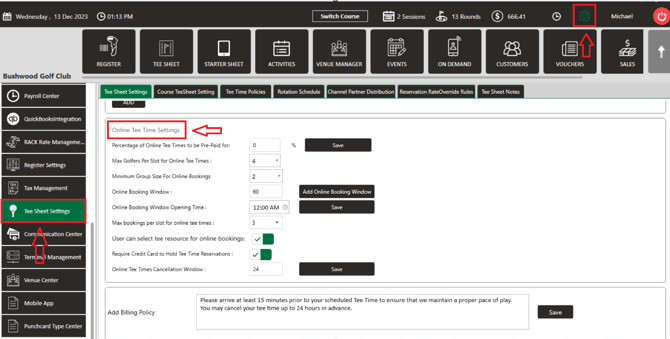
- Scroll down the page to the Online Tee Time Settings box.
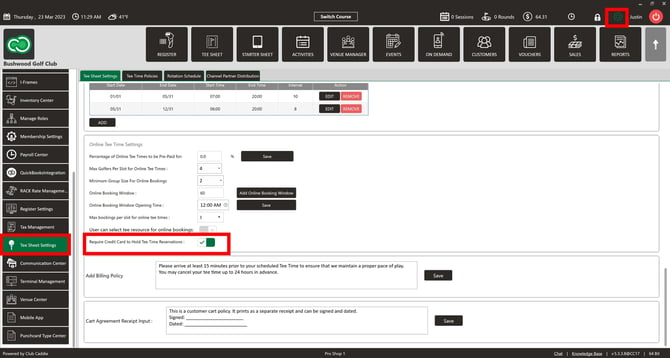
- Turn on Require Credit Card to Hold Tee Time Reservations :. Customers then need a card on file to hold a tee time that is not fully paid online.
Require a card on specific days only
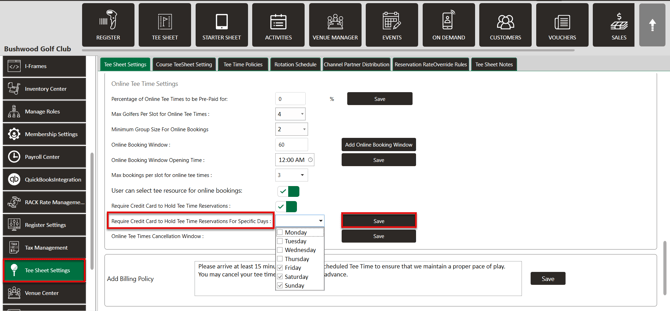
- Make sure Require Credit Card to Hold Tee Time Reservations : is turned on. The days list only narrows the requirement. If no day is checked, the requirement applies every day.
- In the Online Tee Time Settings box, open the Require Credit Card to Hold Tee Time Reservations For Specific Days : dropdown.
- Check the days of the week that should require a card: Monday through Sunday.
- Click Save beside the dropdown.
Common Questions
Where is the setting?
In Tee Sheet Settings, on the Tee Sheet Settings tab, in the Online Tee Time Settings box. Scroll down the page to reach it.
Can I require a card only on weekends?
Yes. Turn on Require Credit Card to Hold Tee Time Reservations :, open the Require Credit Card to Hold Tee Time Reservations For Specific Days : dropdown, check Saturday and Sunday, and click Save.
Does the days dropdown have its own Save?
Yes. Click Save beside the dropdown after you check the days.